
• Skip to primary navigation
  • Skip to main content
  • Skip to primary sidebar
Source Digit

Source Digit

Linux, Ubuntu Tutorials & News, Technology, Gadgets & Gizmos

  • Home
  • How To
  • Ubuntu
  • Instagram
  • Blogging
  • Android
  • WordPress
  • +More
    • Cloud Computing
    • Gadgets
    • Social Media
    • Technology
  • Write for Us
Home / How To / Install Laptop Mode Tools 1.67 in Ubuntu 15.04 & Ubuntu 14.04

Install Laptop Mode Tools 1.67 in Ubuntu 15.04 & Ubuntu 14.04

By Sourabh / July 13, 2015 Category: How To, Ubuntu

Install Laptop Mode Tools 1.67 on Ubuntu 15.04 and Ubuntu 14.04, via PPA. Laptop Mode Tools is a laptop power saving package for Linux systems.

Laptop Mode Tools allows you to extend the battery life of your laptop, in several ways. It is the primary way to enable the Laptop Mode feature of the Linux kernel, which lets your hard drive spin down. In addition, it allows you to tweak a number of other power-related settings using a simple configuration file. It can also be configured to tweak all sorts of other power-related things.
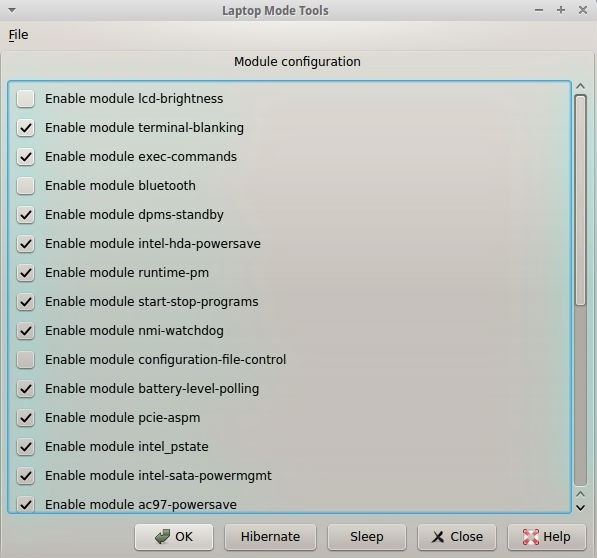
Laptop-Mode-Tools-screen

The core feature of Laptop Mode Tools is that it controls the “laptop mode” feature of the Linux kernel, which prevents disk accesses and allows hard drives to spin down for longer periods of time. In addition, Laptop Mode Tools can tweak things like readahead settings, hard drive power management settings, CPU frequency scaling settings, CPU throttling settings, DPMS settings, terminal blanking settings, and LCD brightness settings. In addition, it can automatically start/stop services based on whether you’re working on battery or on wall power, and it can automatically hibernate your computer when it is low on battery power.

Install Laptop Mode Tools 1.67

Open Terminal and run the following commands to install Laptop Mode Tools 1.67 on Ubuntu 15.04 and Ubuntu 14.04, via PPA.


$ sudo add-apt-repository ppa:ubuntuhandbook1/apps
$ sudo apt-get update
$ sudo apt-get install laptop-mode-tools
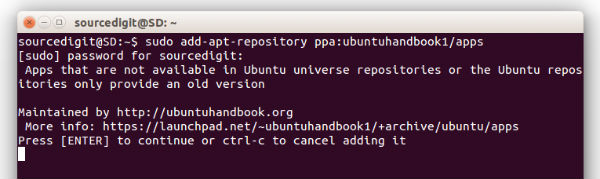
Laptop-Mode-Tools


Once installed, open the Laptop Mode Tools from Ubuntu Dash (type laptop mode tools and click on the icon. Id you wish to access the configuration file, run the command:

$ sudo lmt-config-gui

Uninstall Laptop Mode Tools 1.67

If you are not happy with the Laptop Mode Tools, run the following command to uninstall and remove the laptop-mode-tools from Ubuntu:


$ sudo apt-get remove laptop-mode-tools

Please note that the same installation instructions should work on Ubuntu Derivatives.

Tags: How To Save Battery Power in Ubuntu, How To Save Battery Power in Ubuntu 14.04, How To Save Battery Power in Ubuntu 14.10, How To Save Battery Power in Ubuntu 15.04, Install Laptop Mode Tools 1.67 Ubuntu 14.04, Install Laptop Mode Tools 1.67 Ubuntu 15.04, Install Laptop Mode Tools To Save Power in Ubuntu, Laptop Mode Tools 1.67, Laptop Mode Tools 1.67 Ubuntu, Laptop Mode Tools 1.67 Ubuntu 14.04, Laptop Mode Tools 1.67 Ubuntu 15.04, Laptop Mode Tools Linux, Laptop Mode Tools Ubuntu 14.04, Laptop Mode Tools Ubuntu 15.04, Laptop Mode Tools Ubuntu PPA, Laptop Mode Tools Ubuntu Via PPA, Ubuntu 14.04, Ubuntu 15.04, Ubuntu Install Laptop Mode Tools 1.67, Ubuntu PPA Laptop Mode Tools

Primary Sidebar

Latest Posts

Using Linux Terminal How To Get Total Disk Size In GB

Count And Find Number Of Files In A Linux Directory Using Command

Check How Many Users Are Created In Linux Ubuntu

How To Check User Permissions In Linux Using Command

Check Which Folder Is Taking More Space In Ubuntu Linux

How to Install Claude Desktop App in Ubuntu Linux

Job Scheduling Using At Command In Linux With Examples

How To Check Permissions Of A Directory In Linux Command

Delete Directory And Contents Recursively Without Prompt On Linux

Check User Login History In Ubuntu Linux Command Line

© 2026 Source Digit • Linux, Ubuntu Tutorials & News, Technology, Gadgets & Gizmos

  • Home
  • About
  • Privacy Policy
  • Terms & Conditions
  • Contact Us
  • Sitemap