
• Skip to primary navigation
  • Skip to main content
  • Skip to primary sidebar
Source Digit

Source Digit

Linux, Ubuntu Tutorials & News, Technology, Gadgets & Gizmos

  • Home
  • How To
  • Ubuntu
  • Instagram
  • Blogging
  • Android
  • WordPress
  • +More
    • Cloud Computing
    • Gadgets
    • Social Media
    • Technology
  • Write for Us
Home / How To / Install Windows 10 Theme & Icons On Ubuntu 15.04 & Ubuntu 14.04

Install Windows 10 Theme & Icons On Ubuntu 15.04 & Ubuntu 14.04

By Sourabh / September 16, 2015 Category: How To, Ubuntu

Windows 10 GTK Theme for Linux Ubuntu. Install Windows 10 Theme and Icons on Ubuntu 15.04, Ubuntu 14.04, Gnome 3.x and Cinnamon 2.6 Desktops. Like it’s name suggests, the Windows 10 theme was built to emulate in the closest way possible the GUI of the well-known OS Windows 10.

Windows 10 Theme v0.2 (GTK 3.x Theme/Style)
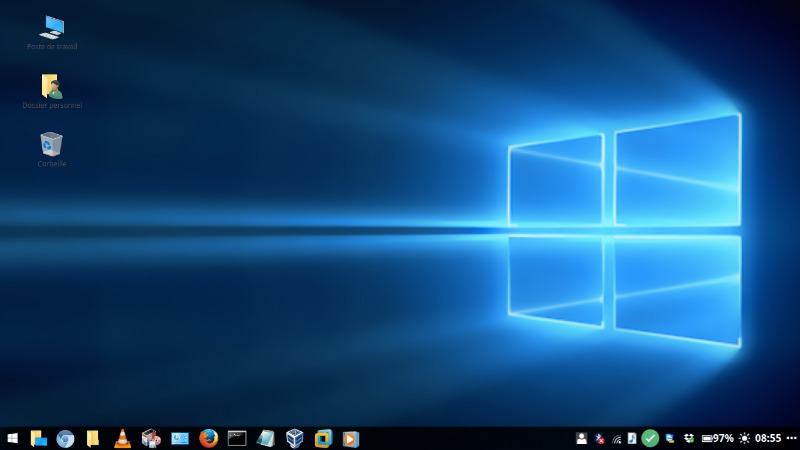
windows-10-linux

Features:

  • Dark terminal background color
  • Metacity Window borders matching those of Win10
  • White app colors
  • Black menu (Cinnamon only)
  • Matching Icon theme and pointer theme!

The theme works with Gnome 3.x and Cinnamon 2.6.

Windows 10 Icons

171321-1

Theme icon for Ubuntu Gnome 15.04 (Gnome shell 3.14.4) based on Windows 10. For install, unzip the file Icons – Windows.tar.gz to path /usr/share/icons/.

The Microsoft Windows and Office Logos are a Copyright and Trademark of Microsoft.

Images via Creative Commons

Tags: Linux Windows 10 GTK Theme, Linux Windows 10 Theme, Ubuntu 14.04 Windows 10 Icons, Ubuntu 14.04 Windows 10 Theme, Ubuntu 15.04 Windows 10 Icons, Ubuntu 15.04 Windows 10 Theme, Ubuntu Windows 10 GTK Theme, Ubuntu Windows 10 Icons, Ubuntu Windows 10 Theme, Windows 10 GTK Theme Linux, Windows 10 GTK Theme Ubuntu, Windows 10 Icons Ubuntu, Windows 10 Icons Ubuntu 14.04, Windows 10 Icons Ubuntu 15.04, Windows 10 Theme Linux, Windows 10 Theme Ubuntu, Windows 10 Theme Ubuntu 14.04, Windows 10 Theme Ubuntu 15.04

Primary Sidebar

Latest Posts

Delete Directory And Contents Recursively Without Prompt On Linux

Check User Login History In Ubuntu Linux Command Line

Use Locate Command To Find File In Linux Terminal By Name

How To Change Terminal Color In Ubuntu Command Line

How To Run Fsck Manually In Linux To Fix Unexpected Inconsistency

How To Fix Broken Packages On Ubuntu From Terminal

Re Execute The Previous Command In Linux Ubuntu Command Line

How Much RAM Is Needed For Ubuntu PC

How To Find Large Files And Directories In Linux Command Line

How To Use Clear Command History In Linux Terminal

© 2026 Source Digit • Linux, Ubuntu Tutorials & News, Technology, Gadgets & Gizmos

  • Home
  • About
  • Privacy Policy
  • Terms & Conditions
  • Contact Us
  • Sitemap