
• Skip to primary navigation
  • Skip to main content
  • Skip to primary sidebar
Source Digit

Source Digit

Linux, Ubuntu Tutorials & News, Technology, Gadgets & Gizmos

  • Home
  • How To
  • Ubuntu
  • Instagram
  • Blogging
  • Android
  • WordPress
  • +More
    • Cloud Computing
    • Gadgets
    • Social Media
    • Technology
  • Write for Us
Home / How To / Install Fotoxx 16.01 Image Editor On Ubuntu 15.10 & Ubuntu 14.04

Install Fotoxx 16.01 Image Editor On Ubuntu 15.10 & Ubuntu 14.04

By Sourabh / January 23, 2016 Category: How To, Ubuntu

Install Fotoxx 16.01 image editor on Ubuntu 15.10, Ubuntu 14.04, Ubuntu 14.10, Ubuntu 15.10 and Ubuntu Derivative Systems. Fotoxx is a free open source Linux program for photo and image editing and collection management. Fotoxx 16.01 is the latest version available of the Fotoxx image editor program. Fotoxx 16.01 has been released with the following changes:

  • Edit Any Metadata and Batch Add/Change Metadata: faster/easier UI: mouse point and click to select metadata items from a list of most likely items.
  • Panorama: a manual alignment option was added for images with no clear features in the overlap area that can be used for auto-alignment.
  • Batch Convert: add an overlay image to output images (e.g. a credit line).
  • Slide Show: minor changes to improve user interface (see User Guide).
  • Image right-shift is now a user option with no more back-and-forth motion.
  • Search Images: new option for text data matching: case-sensitive or not.
  • New user option: default gallery sort: file name, file mod date, photo date.
  • A new function for color saturation was added (separate from Retouch Combo).
  • Bug-fix: Search Images for metadata was including some non-matching images.
  • Bug-fix: possible crash in Select Area if ‘extend to corner’ is active.

Install Fotoxx 16.01 on Ubuntu
fotoxx-install-img

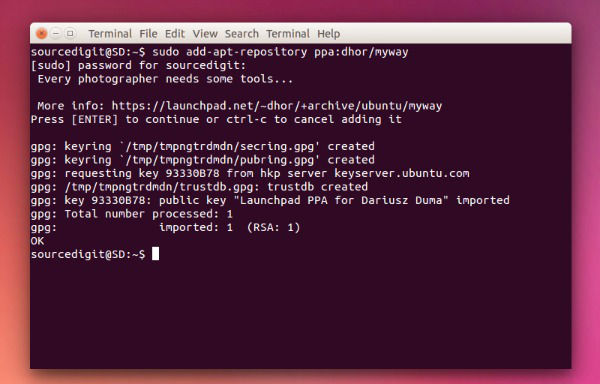
Fotoxx 16.01 can be installed on Ubuntu 15.10, Ubuntu 14.04, Ubuntu 14.10, Ubuntu 15.10 and Ubuntu Derivative Systems. Run the following commands in Terminal to install the fotoxx package on Ubuntu:

$ sudo add-apt-repository ppa:dhor/myway
$ sudo apt-get update
$ sudo apt-get install fotoxx

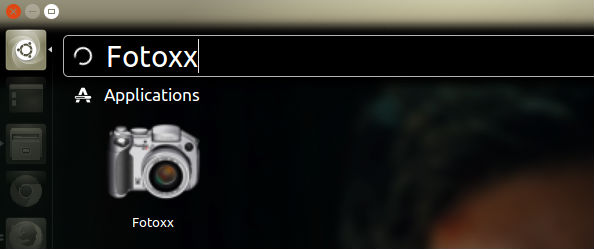
Once installed, open Fotoxx from Ubuntu Dash.
fotoxx-open

If you wish to uninstall and remove fotoxx from Ubuntu Systems, run the following command:

$ sudo apt-get remove fotoxx

Tags: Download Fotoxx Ubuntu, Fotoxx 16.01 Image Editor, Fotoxx 16.01 Image Editor Ubuntu, Fotoxx 16.01 Open-Source Image Editor, Fotoxx 16.01 Ubuntu, Fotoxx 16.01 Ubuntu Image Editor, Fotoxx Image Editor, Fotoxx Image Editor Ubuntu, Fotoxx Ubuntu, Fotoxx Ubuntu Download, Fotoxx Ubuntu Image Editor, Fotoxx Ubuntu Install, Fotoxx Ubuntu PPA, Install Fotoxx Ubuntu, Ubuntu PPA Fotoxx

Primary Sidebar

Latest Posts

Delete Directory And Contents Recursively Without Prompt On Linux

Check User Login History In Ubuntu Linux Command Line

Use Locate Command To Find File In Linux Terminal By Name

How To Change Terminal Color In Ubuntu Command Line

How To Run Fsck Manually In Linux To Fix Unexpected Inconsistency

How To Fix Broken Packages On Ubuntu From Terminal

Re Execute The Previous Command In Linux Ubuntu Command Line

How Much RAM Is Needed For Ubuntu PC

How To Find Large Files And Directories In Linux Command Line

How To Use Clear Command History In Linux Terminal

© 2026 Source Digit • Linux, Ubuntu Tutorials & News, Technology, Gadgets & Gizmos

  • Home
  • About
  • Privacy Policy
  • Terms & Conditions
  • Contact Us
  • Sitemap