
• Skip to primary navigation
  • Skip to main content
  • Skip to primary sidebar
Source Digit

Source Digit

Linux, Ubuntu Tutorials & News, Technology, Gadgets & Gizmos

  • Home
  • How To
  • Ubuntu
  • Instagram
  • Blogging
  • Android
  • WordPress
  • +More
    • Cloud Computing
    • Gadgets
    • Social Media
    • Technology
  • Write for Us
Home / How To / Install Handbrake Ubuntu Video Converter On Ubuntu Systems

Install Handbrake Ubuntu Video Converter On Ubuntu Systems

By Sourabh / August 4, 2017 Category: How To, Ubuntu

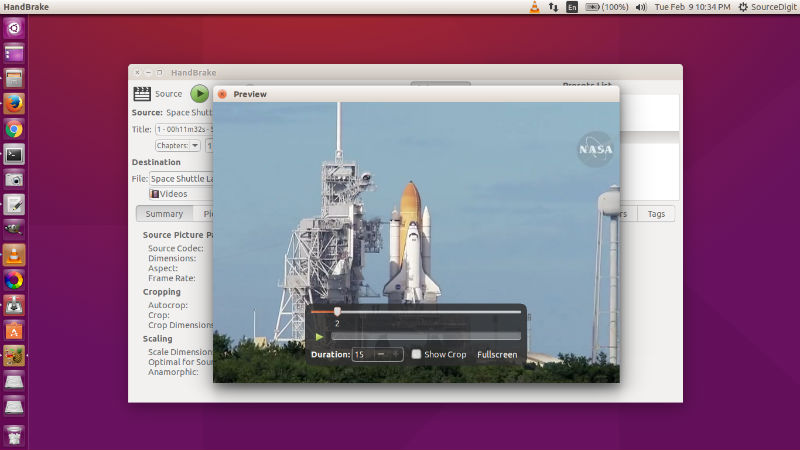
Install Handbrake Ubuntu Video Converter (Command Line) for Ubuntu. Here’s how to Install HandBrake from PPA in Ubuntu. Use Ubuntu Handbrake CLI to convert video files to mp4 in Ubuntu System. HandBrake is a media conversion tool to rip and convert audio and video files. It can rip DVDs/CDs or create .iso images.
handbrake-ubuntu-16

 Features:

  • Convert Video from any format
  • Built-in device presets e.g. iPhone, iPad, AppleTV, Android etc
  • Ability to process DVD and BlueRay sources
  • File Containers: .MP4(.M4V) and .MKV
  • Video Encoders: H.264(x264), H.265(x265) MPEG-4 and MPEG-2 (libav), VP8 (libvpx) and Theora
  • Audio Encoders: AAC, CoreAudio AAC/HE-AAC (OS X Only), MP3, Flac, AC3, or Vorbis
  • Audio Pass-thru: AC-3, DTS, DTS-HD, AAC and MP3 tracks
  • Title / Chapter selection
  • Subtitles (VobSub, Closed Captions CEA-608, SSA, SRT)
  • Video Filters: Deinterlacing, Decomb, Denoise, Detelecine, Deblock, Grayscale, Cropping and scaling

Handbrake can process most common multimedia files and any DVD or BluRay sources that do not contain any kind of copy protection.

Outputs:

  • File Containers: .MP4(.M4V) and .MKV
  • Video Encoders: H.264(x264 and QuickSync), H.265(x265) MPEG-4 and MPEG-2 (libav), VP8 (libvpx) and Theora(libtheora)
  • Audio Encoders: AAC / HE-AAC, MP3, Flac, AC3, or Vorbis
  • Audio Pass-thru: AC-3, DTS, DTS-HD, AAC and MP3 tracks

Install Handbrake in Ubuntu
handbrake-cli

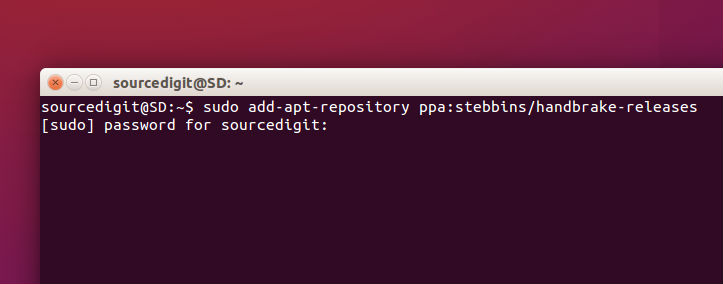
For Linux Ubuntu systems, Handbrake can be installed in CLI ( Command Line Interface) and GUI (Graphical User Interface) variants. Open Terminal and run the following commands in Terminal:

sudo add-apt-repository ppa:stebbins/handbrake-releases
sudo apt-get update
sudo apt-get install handbrake

Run the following commands to install Handbrake GUI:

sudo apt-get install handbrake-gtk

Run the following commands to install HandBrake CLI:

sudo apt-get install handbrake-cli

Once installed, open the Handbrake application from Ubuntu dash or menu.

Tags: Handbrake 0.10.3, Handbrake 0.10.3 Ubuntu, Handbrake DVD Ripper, Handbrake DVD Ripper Ubuntu, Handbrake Transcoder, Handbrake Transcoder Ubuntu, Handbrake Ubuntu, HandBrake Ubuntu PPA, HandBrake Video Converter, Handbrake Video Converter Ubuntu, Install Handbrake 0.10.3 Linux, Install Handbrake 0.10.3 Ubuntu, Install Handbrake DVD Ripper on Ubuntu, Install Handbrake Transcoder on Ubuntu, Install Handbrake Ubuntu, Install Handbrake Ubuntu 14.04, Install Handbrake Ubuntu 14.10, Install Handbrake Ubuntu 15.04, Install Handbrake Ubuntu 15.10, Install Handbrake Video Converter On Ubuntu, Ubuntu Handbrake, Ubuntu Handbrake 0.10.3, Ubuntu Handbrake DVD Ripper, Ubuntu Handbrake Transcoder, Ubuntu Handbrake Video Converter, Ubuntu PPA Handbrake, Upgrade Handbrake 0.10.3 Ubuntu

Primary Sidebar

Latest Posts

Delete Directory And Contents Recursively Without Prompt On Linux

Check User Login History In Ubuntu Linux Command Line

Use Locate Command To Find File In Linux Terminal By Name

How To Change Terminal Color In Ubuntu Command Line

How To Run Fsck Manually In Linux To Fix Unexpected Inconsistency

How To Fix Broken Packages On Ubuntu From Terminal

Re Execute The Previous Command In Linux Ubuntu Command Line

How Much RAM Is Needed For Ubuntu PC

How To Find Large Files And Directories In Linux Command Line

How To Use Clear Command History In Linux Terminal

© 2026 Source Digit • Linux, Ubuntu Tutorials & News, Technology, Gadgets & Gizmos

  • Home
  • About
  • Privacy Policy
  • Terms & Conditions
  • Contact Us
  • Sitemap