
• Skip to primary navigation
  • Skip to main content
  • Skip to primary sidebar
Source Digit

Source Digit

Linux, Ubuntu Tutorials & News, Technology, Gadgets & Gizmos

  • Home
  • How To
  • Ubuntu
  • Instagram
  • Blogging
  • Android
  • WordPress
  • +More
    • Cloud Computing
    • Gadgets
    • Social Media
    • Technology
  • Write for Us
Home / Ubuntu / How To List Connected USB Devices In Linux Ubuntu

How To List Connected USB Devices In Linux Ubuntu

By Sourabh / March 3, 2017 Category: How To, Ubuntu

How to list connected USB devices in Linux Ubuntu. An easy way to list USB devices in Linux; find USB device name and find USB device path.

There are many ways to get the info about USB device and find the name of USB device connected to the system. Before we begin, you must know about the following two basic commands:

1.To see a list of your USB devices (the vendor and device ID’s), run:

lsusb

2. To see information about currently mounted systems, simply run:

mount

lsusb Command

Ubuntu users can use lsusb command utility for displaying information about USB buses in the system and the devices connected to them. The command is simple and easy to use. It can be executed alone or with various command parameters.
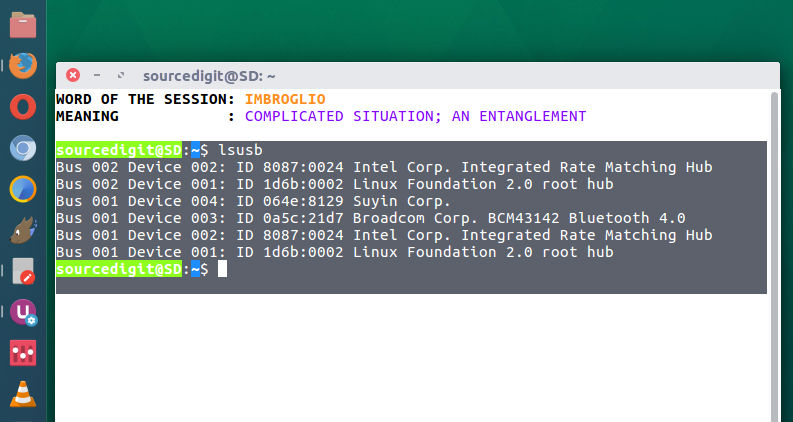
Below is the list of command arguments that are supported by lsusb command:

-v, –verbose

Increase verbosity (show descriptors)

-s [[bus]:][devnum]

Show only devices with specified device and/or bus numbers (in decimal)

-d vendor:[product]

Show only devices with the specified vendor and product ID numbers (in hexadecimal)

-D device

Selects which device lsusb will examine

-t, –tree

Dump the physical USB device hierarchy as a tree

-V, –version

Show version of program

-h, –help

Show usage and help

Tags: Linux Find Usb Device Name, Linux Find Usb Device Path, Linux List Devices Command, Linux Lsusb Command, List Connected Usb Devices Linux, Lsusb Command Examples, Lsusb Command In Linux, Lsusb Command Linux, Lsusb Command Ubuntu, Mount Usb Device Ubuntu, Open /Dev/Input/Event0: Permission Denied, Ubuntu Device Name, Ubuntu List Usb Devices Tty, Ubuntu Lsusb Command, Using Lsusb Command

Primary Sidebar

Latest Posts

Delete Directory And Contents Recursively Without Prompt On Linux

Check User Login History In Ubuntu Linux Command Line

Use Locate Command To Find File In Linux Terminal By Name

How To Change Terminal Color In Ubuntu Command Line

How To Run Fsck Manually In Linux To Fix Unexpected Inconsistency

How To Fix Broken Packages On Ubuntu From Terminal

Re Execute The Previous Command In Linux Ubuntu Command Line

How Much RAM Is Needed For Ubuntu PC

How To Find Large Files And Directories In Linux Command Line

How To Use Clear Command History In Linux Terminal

© 2026 Source Digit • Linux, Ubuntu Tutorials & News, Technology, Gadgets & Gizmos

  • Home
  • About
  • Privacy Policy
  • Terms & Conditions
  • Contact Us
  • Sitemap