
• Skip to primary navigation
  • Skip to main content
  • Skip to primary sidebar
Source Digit

Source Digit

Linux, Ubuntu Tutorials & News, Technology, Gadgets & Gizmos

  • Home
  • How To
  • Ubuntu
  • Instagram
  • Blogging
  • Android
  • WordPress
  • +More
    • Cloud Computing
    • Gadgets
    • Social Media
    • Technology
  • Write for Us
Home / How To / Install Bmon Linux Network Monitoring Software

Install Bmon Linux Network Monitoring Software

By Sourabh / February 16, 2017 Category: How To, Ubuntu

Install bmon network monitoring tool in Linux Ubuntu. bmon is one of the most effective Linux network monitoring tools. On Ubuntu, it can be used to monitor network traffic. bmon is a monitoring and debugging tool to capture networking related statistics and prepare them visually in a human friendly way. It features various output methods including an interactive curses user interface and a programmable text output for scripting.

Install bmon in Linux
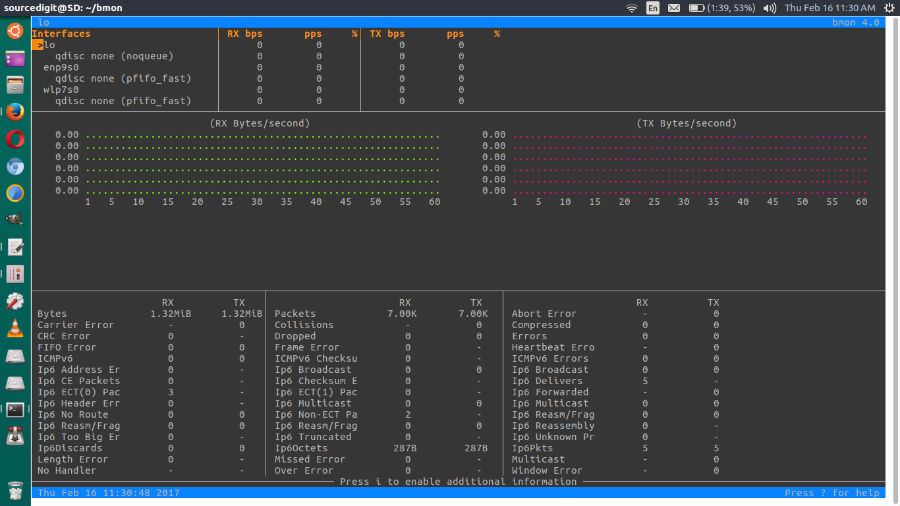
Run the following commands in Terminal to install bmon Bandwidth Monitoring Tool in Linux Ubuntu Systems – Ubuntu 16.10, Ubuntu 16.04, Ubuntu 15.10, Ubuntu 15.04, Ubuntu 14.10, Ubuntu 14.04 and Ubuntu Systems.

$ git clone https://github.com/tgraf/bmon.git
$ cd bmon
$ sudo apt-get install build-essential make libconfuse-dev libnl-3-dev libnl-route-3-dev libncurses-dev pkg-config dh-autoreconf
$ sudo ./autogen.sh
$ sudo ./configure
$ sudo make
$ sudo make install
$ bmon

Once installed, to run bmon in the default curses mode:
bmon

There are many other options available and full help is provided via:
bmon --help

It will then display the network statistics.

Tags: Centos Monitor Network Traffic, Internet Monitoring Tool In Linux, Linux Bandwidth Monitor Per Ip, Linux Iftop, Linux Monitoring Tools Open Source, Linux Monitoring Tools Web Based, Linux Network Monitoring Software, Linux Network Monitoring Tools, Linux Performance Monitoring Tools, Linux Server Monitoring Tools, Linux System Monitor Gui, Network Bandwidth Monitoring Tool In Linux, Tcptrack, Tcptrack Usage, Ubuntu Bandwidth Monitor, Ubuntu Monitor Network Traffic, Wifi Bandwidth Monitoring Tool In Linux, Wifi Monitoring Tool In Linux

Primary Sidebar

Latest Posts

Delete Directory And Contents Recursively Without Prompt On Linux

Check User Login History In Ubuntu Linux Command Line

Use Locate Command To Find File In Linux Terminal By Name

How To Change Terminal Color In Ubuntu Command Line

How To Run Fsck Manually In Linux To Fix Unexpected Inconsistency

How To Fix Broken Packages On Ubuntu From Terminal

Re Execute The Previous Command In Linux Ubuntu Command Line

How Much RAM Is Needed For Ubuntu PC

How To Find Large Files And Directories In Linux Command Line

How To Use Clear Command History In Linux Terminal

© 2026 Source Digit • Linux, Ubuntu Tutorials & News, Technology, Gadgets & Gizmos

  • Home
  • About
  • Privacy Policy
  • Terms & Conditions
  • Contact Us
  • Sitemap