

Download and install Python-pip on Ubuntu. Install Pip on Ubuntu 15.10, Ubuntu 15.04 and Ubuntu 14.04. Python-pip installation commands (Terminal) for Linux Ubuntu Systems. pip is a package management system used to install and manage software packages written in Python. It is widely belived that pip is a recursive acronym for “Pip Installs Packages” or […]
How To
How-to tutorials for Ubuntu, Linux, Android, WordPress, websites and more. Learn about Ubuntu Linux how to solve problems, errors, manage updates, fix issues and add functions & features.
How To Play PSP Games in Linux Ubuntu Systems

How to Play PSP Games in Linux Ubuntu Systems. Install PPSSPP 1.1 PSP emulator for Ubuntu 15.10, Ubuntu 15.04 and Ubuntu 14.04. PPSSPP is a PSP emulator written in C++, that can run your PSP games on your PC in full HD resolution, and play them on Android too. It can even upscale textures that […]
Install Linux Kernel 4.2.3 (Stable) on Ubuntu 15.10, Ubuntu 15.04 & Ubuntu 14.04

Install Linux Kernel 4.2.3 (Stable) on Ubuntu 15.10, Ubuntu 15.04 and Ubuntu 14.04. How to Upgrade to Linux Kernel 4.2.3 (stable) on Ubuntu Systems. Linux Kernel 4.2.3 comes with many networking improvements such as open vSwitch and IPv6 Fixes and an updated Networking Drivers. It also brings various Hardware Improvements ARM64 fixes. The release of […]
Install Ubuntu Flat Theme Flatabulous On Ubuntu 15.04 & Ubuntu 14.04
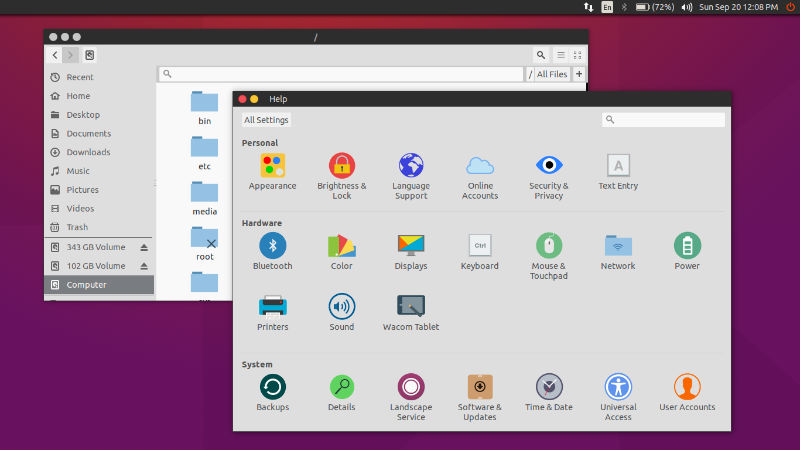
Flatabulous Ubuntu Theme. How to install Ubuntu Flat Theme Flatabulous on Ubuntu 15.04 and Ubuntu 14.04. Flatabulous is a Flat theme for Ubuntu and other Debian based Linux Systems. This is based on a the Ultra-Flat theme. Flatabulous Theme To install the Flatabulous Ubuntu Theme, you must first install the Ubuntu tweak tool (used to […]
Install Cutegram 2.7.0 Telegram Client on Ubuntu 15.04 & Ubuntu 14.04
Cutegram Telegram Client for Linux. Install Cutegram 2.7.0 on Ubuntu 15.04, Ubuntu 14.04, Ubuntu 15.10 and Ubuntu Derivatives. Cutegram is a free and opensource telegram clients for Linux, Windows, OS X and OpenBSD. The Cutegram focuses on user friendly, compatibility with desktop environments. Cutegram using Qt5, QML, libqtelegram, libappindication, AsemanQtTools technologies and Faenza icons and […]
India’s First Ubuntu Hackathon: 2015 Bangalore Mobile Developer Summit
India’s First Ubuntu Hackathon. 2015 Ubuntu Hackathon, Bangalore; Ubuntu Hackathon: 2015 Bangalore Mobile Developer Summit, October 15-16, 2015 at Indian Institute of Science, Bangalore, India. Canonical are platinum sponsors at the Mobile Developer Summit in Bangalore this year, and will be hosting the very first Ubuntu hackathon in India from 15-16 October 2015. The Aquaris […]