

How to install VLC 2.2.1 on Ubuntu 15.04, Ubuntu 14.10 and Ubuntu 14.04. VLC media player is the best multi-format media player. VLC is a free and open source cross-platform multimedia player and framework that plays most multimedia files as well as DVDs, Audio CDs, VCDs, and various streaming protocols. The VLC Version 2+ (“Twoflower”) […]
How To
How-to tutorials for Ubuntu, Linux, Android, WordPress, websites and more. Learn about Ubuntu Linux how to solve problems, errors, manage updates, fix issues and add functions & features.
Install Syncthing GTK 0.6.5 – Open Source File Synchronization Tool – On Ubuntu 15.04/14.10/14.04
How to install Syncthing and Syncthing GTK on Linux Ubuntu Systems. Install Syncthing GTK 0.6.5 on Ubuntu 14.10, Ubuntu 14.04 and Derivatives. Syncthing is an open-source file synchronization client/server application. It allows users to easily synchronize files and directories between different computers in a secured, encrypted manner. Syncthing is still in development, although a large […]
Install Nvidia 349.16 Linux x64 (AMD64/EM64T) Display Driver on Ubuntu 14.10, Ubuntu 14.04 & Derivatives
Nvidia 349.16 Linux x64 (AMD64/EM64T) Display Driver has been released. Here’s how to install the NVIDIA 349.16 Beta GPU driver on Linux Ubuntu 14.10/14.10 and Ubuntu Systems. Newly released Linux x64 (AMD64/EM64T) Display Driver has added support for the following GPUs – Quadro K1200, Quadro M6000, GeForce 920M, GeForce 930A, GeForce 930M, GeForce 940M, GeForce […]
How To Upgrade To Ubuntu 15.04 From Ubuntu 14.10 & Ubuntu 14.04
Upgrade to Ubuntu 15.04 “Vivid Vervet” – Here’s is how to upgrade to Ubuntu 15.04 from Ubuntu 14.10 and Ubuntu 14.04. You can upgrade Ubuntu 14.10/14.04 to Ubuntu 15.04 “Vivid Vervet” in easy manner. If you are using either Ubuntu 14.04 or Ubuntu 14.10 and want to upgrade to Ubuntu 15.04, you have to perform […]
Install Messenger For Desktop 1.2.2 (Unofficial Facebook Desktop Messenger) on Linux Ubuntu
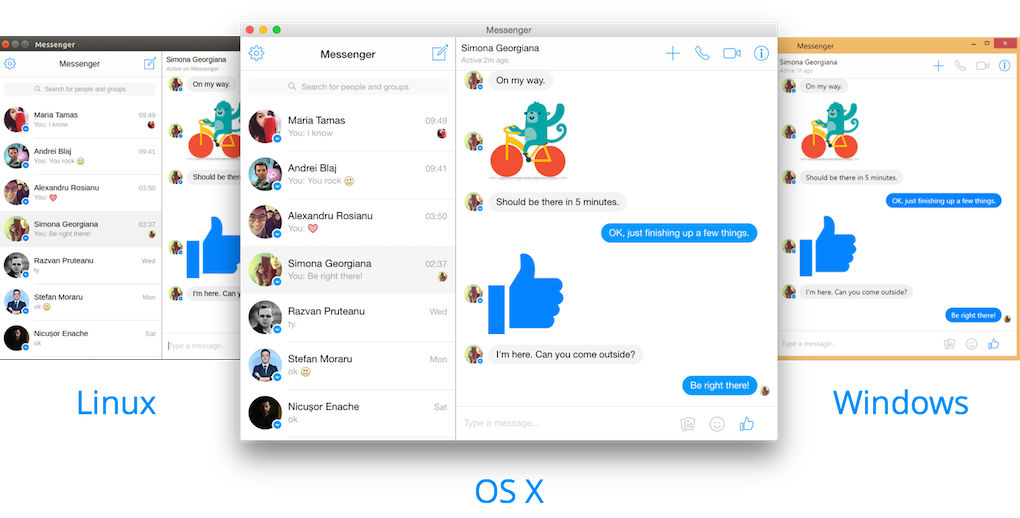
How to install Facebook Messenger for Desktop 1.2.2 on Linux Ubuntu Systems. Messenger for Desktop 1.2.2 is the unofficial desktop messenger for Facebook. Messenger for Desktop is a beautiful desktop client for Facebook Messenger. It allows to chat without being distracted by your feed or notifications. The pp comes with the following features: Chat with […]
Top 10 Ubuntu 14.04/14.10/15.04 Themes – Ubuntu GTK 3.x Themes
Download and install custom themes for Ubuntu – Ubuntu GTK 3.x Theme (GNOME+UNITY). Best Ubuntu 14.04 Themes, Ubuntu 14.10 Themes and Ubuntu 15.04 Themes. Download these Ubuntu GTK Themes and customize the Ubuntu UNITY desktop. Grey-Ambiance Download Grey-Ambiance Ubuntu Theme Numix Flat Download Numix Flat Ubuntu Theme FlatBG 1.1 Download Flat BG Ubuntu Theme BlueLaguna […]