

Ever wondered what apps do bloggers use for Instagram? Here is the collection of the best Instagram photo editing apps and Instagram video editing apps. Photo Editing Apps for Instagram Here is the collection of 5 best apps for editing photos for Instagram for Android. 1. Snapseed Download Snapseed is a complete and professional photo […]
Best Free Apps to Plan Instagram Feed Before Posting

How to design Instagram feed? Here are the best free apps to plan Instagram feed which can help you to see Instagram feed before posting. 1. Preview – Plan your Instagram Download Preview is your visual planner for Instagram. Predict what your feed will look like before you post anything on Instagram. It has all […]
5 Best Apps for Creating Instagram Stories

5 Handpicked apps to create Instagram story. Here are some of the best apps to edit photos for Instagram story and make your Instagram story better. These apps can help you to put text or music on the Instagram stories and publish it immediately. Unfold Download: iOS & Android Unfold is a toolkit for storytellers. […]
How to Remove Just Another WordPress Site from Title

Here is to change or remove Just Another WordPress Site from title. Also learn how to fix Just Another WordPress Site error if you can’t remove Just Another WordPress Site from Goggle. The default tagline “Just another WordPress site” is displayed right under the site title on the frontend of your WordPress site. You can […]
How To Take Screenshot In Ubuntu Terminal
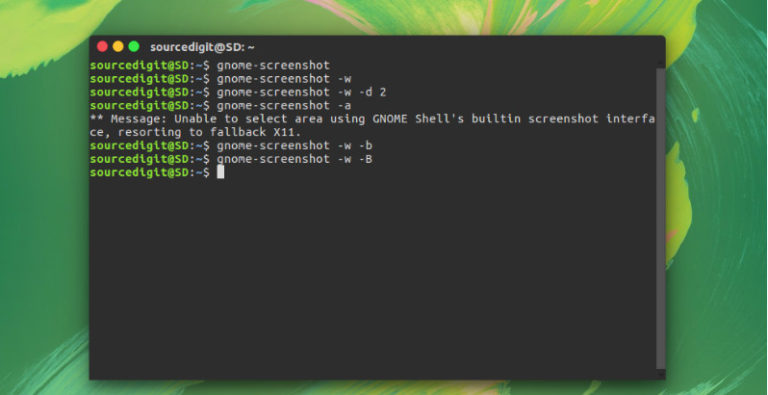
How to take screenshot in Ubuntu Terminal. Learn about Ubuntu screenshot shortcut and Ubuntu screenshot command. Shortcut key to take screenshot in Ubuntu – How to print screen in Ubuntu. Ubuntu screenshot shortcut and command to capture screen in Ubuntu. How to take a screenshot in Linux Ubuntu? Go to the Dash and open the […]
Install KeePass Linux Password Manager on Ubuntu
KeePassXC 2.5.0 password manager released. Install KeePass password manager on Ubuntu Linux Systems. KeePassXC 2.5.0 mainly features user interface and integration enhancements. KeePassXC is a community fork of KeePassX, the cross-platform port of KeePass for Windows. Every feature works cross-platform and was thoroughly tested on multiple systems to provide users with the same look and […]