
• Skip to primary navigation
  • Skip to main content
  • Skip to primary sidebar
Source Digit

Source Digit

Linux, Ubuntu Tutorials & News, Technology, Gadgets & Gizmos

  • Home
  • How To
  • Ubuntu
  • Instagram
  • Blogging
  • Android
  • WordPress
  • +More
    • Cloud Computing
    • Gadgets
    • Social Media
    • Technology
  • Write for Us
Home / How To / Linux Mint Tutorial – How to Upgrade to Linux Mint 17.1 “Rebecca” Cinnamon

Linux Mint Tutorial – How to Upgrade to Linux Mint 17.1 “Rebecca” Cinnamon

By Sourabh / February 21, 2015 Category: How To, Ubuntu

Linux Mint Tutorial – How to upgrade to Linux Mint 17.1 “Rebecca” Cinnamon. Upgrade Cinnamon and MATE editions of Linux Mint 17 to version 17.1 (Mint 17.1 Rebecca).

Upgrading from Linux Mint 17 to Linux Mint 17.1 will upgrade from Qiana to Rebecca and alos apply all level 1 updates. Which means, there is no need to apply level 2, 3, 4 or 5 updates to upgrade to the new version of Linux Mint.

Please note that the Linux Mint Level 4 and 5 updates are not recommended for normal users unless they are much needed. These Level updates should also be applied selectively and with great precautions.

Upgarde Linux Mint 17.1 “Rebecca” Cinnamon

To upgrade and update Linux Mint 17.1 “Rebecca” Cinnamon, follow the steps given below:

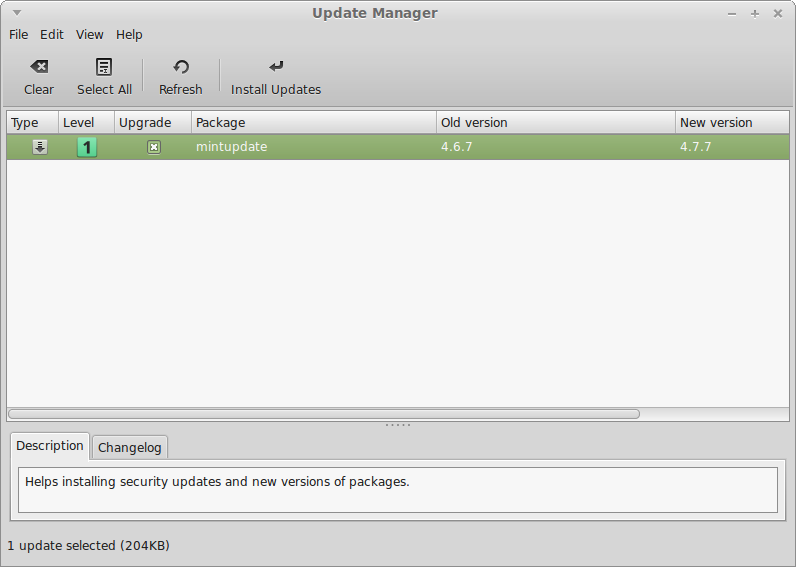
  • Open Update Manager and click on the Refresh button.
  • It will immediately check for any new version of Linux Mint update.
Linux-Mint-17-1-Rebecca-1

  • If you are displayed the latest Mint version update, apply it and wait for the Update Manager to restart itself.
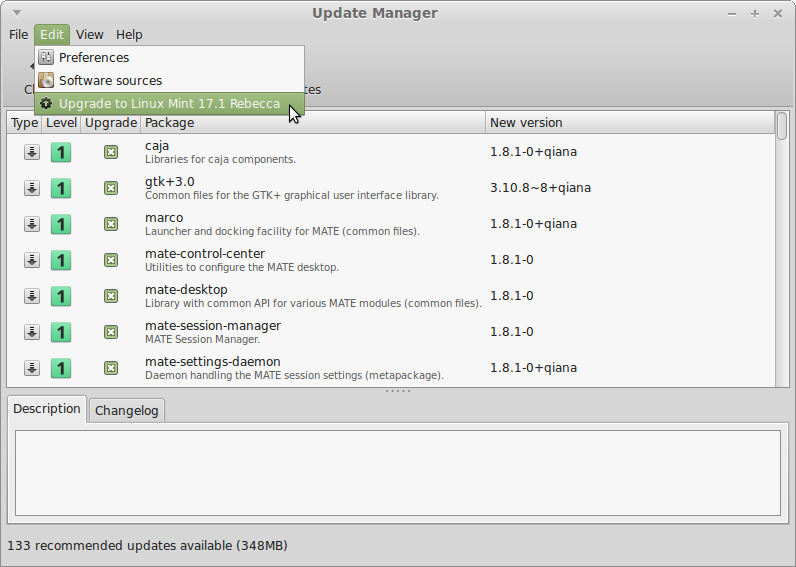
  • Launch the System Upgrade by clicking on “Edit->Upgrade to Linux Mint 17.1 Rebecca”.
Linux-Mint-17-1-Rebecca-2

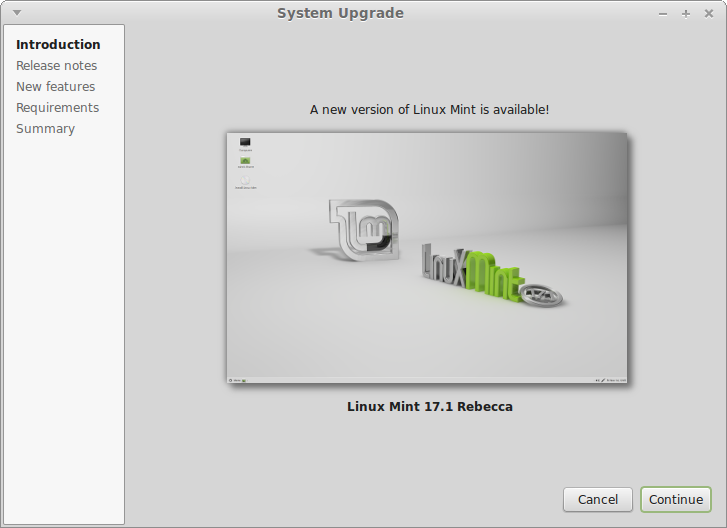
  • Follow the instructions on the screen.
  • Once the upgrade is finished, please reboot the computer.
Linux-Mint-17-1-Rebecca-3

That’s it. You have successfully upgraded to Linux Mint 17.1 “Rebecca” Cinnamon.

Tags: Download Linux Mint 17.1 Rebecca, How to Download Linux Mint 17.1 “Rebecca”, How to Install Linux Mint 17.1 “Rebecca”, How to upgrade from Linux Mint 17 to 17.1, How to Upgrade From Linux Mint 17 To Linux Mint 17.1 “Rebecca”, How to Upgrade Linux Mint 17.1 “Rebecca”, How to Upgrade to Linux Mint 17.1 From Linux Mint 17, Install Linux Mint 17.1 “Rebecca”, Linux Mint, Linux Mint 17.1, Linux Mint 17.1 “Rebecca” Cinnamon, Linux Mint 17.1 Cinnamon, Linux Mint 17.1 OEM Images, Linux Mint 17.1 Rebecca, Upgarde Linux Mint 17.1 “Rebecca” Cinnamon, Upgrade to Linux Mint 17.1 “Rebecca” MATE

Primary Sidebar

Latest Posts

Delete Directory And Contents Recursively Without Prompt On Linux

Check User Login History In Ubuntu Linux Command Line

Use Locate Command To Find File In Linux Terminal By Name

How To Change Terminal Color In Ubuntu Command Line

How To Run Fsck Manually In Linux To Fix Unexpected Inconsistency

How To Fix Broken Packages On Ubuntu From Terminal

Re Execute The Previous Command In Linux Ubuntu Command Line

How Much RAM Is Needed For Ubuntu PC

How To Find Large Files And Directories In Linux Command Line

How To Use Clear Command History In Linux Terminal

© 2026 Source Digit • Linux, Ubuntu Tutorials & News, Technology, Gadgets & Gizmos

  • Home
  • About
  • Privacy Policy
  • Terms & Conditions
  • Contact Us
  • Sitemap