
• Skip to primary navigation
  • Skip to main content
  • Skip to primary sidebar
Source Digit

Source Digit

Linux, Ubuntu Tutorials & News, Technology, Gadgets & Gizmos

  • Home
  • How To
  • Ubuntu
  • Instagram
  • Blogging
  • Android
  • WordPress
  • +More
    • Cloud Computing
    • Gadgets
    • Social Media
    • Technology
  • Write for Us
Home / How To / How To Install Syncthing 0.10.26 On Ubuntu 14.10 and Ubuntu 14.04

How To Install Syncthing 0.10.26 On Ubuntu 14.10 and Ubuntu 14.04

By Sourabh / March 16, 2015 Category: How To, Ubuntu

How to install Syncthing 0.10.26 on Ubuntu 14.10 and Ubuntu 14.04. Syncthing is an open-source file synchronization client/server application. It allows users to easily synchronize files and directories between different computers in a secured, encrypted manner.

Syncthing is still in development, although a large number of features have already been implemented:

  • Web GUI. Configure and monitor Syncthing via a responsive and powerful interface accessible via your browser.
  • Portable. Works on Mac OS X, Windows, Linux, FreeBSD and Solaris. Run it on your desktop computers and synchronize them with your server for backup.
  • Simple. Syncthing doesn’t need IP addresses or advanced configuration: it just works, over LAN and over the Internet. Every machine is identified by an ID. Just give your ID to you friends, share a folder and watch: UPnP will do if you don’t want to port forward or you don’t know how.
  • Powerful. Synchronize as many folders as you need with different people.

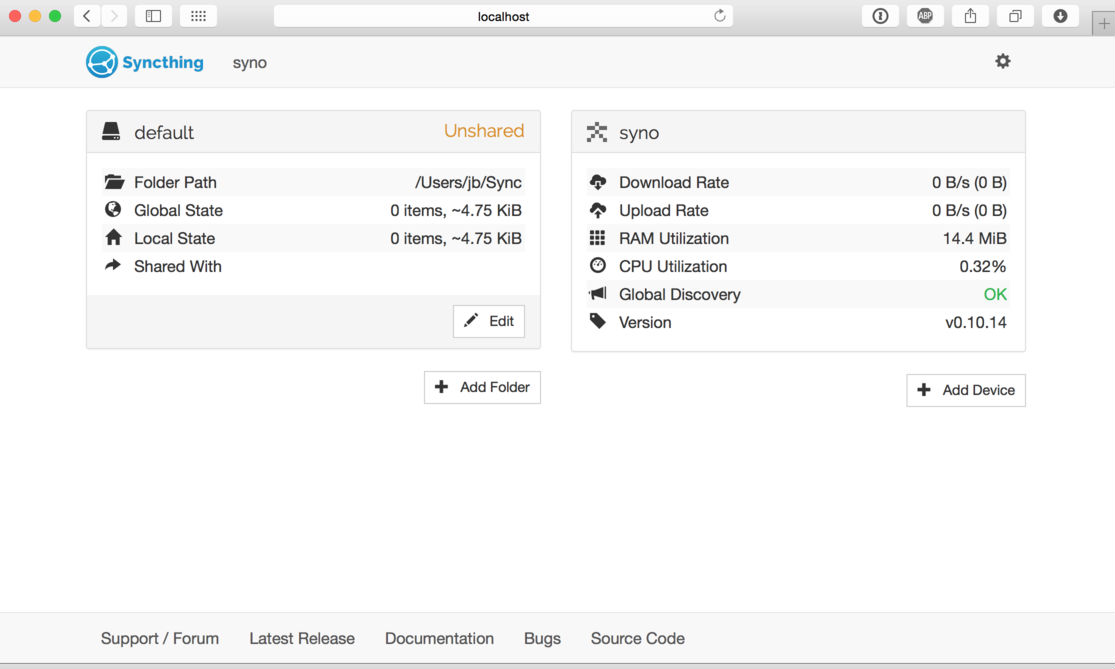
The Syncthing appl has only a Web UI to perform Syncthing tasks. The admin GUI starts automatically and remains available on http://localhost:8080/. It looks like this:
Syncthing-Ubuntu

On the left is the list of “folders”, or directories to synchronize. On the right is the list of devices. Currently there is only one device, the computer you are running this on. For Syncthing to be able to synchronize files with another device, it must be told about that device. This is accomplished by exchanging “device IDs”.

Two devices will only connect and talk to each other if they both know about the others’ device ID.

Tags: How To Install Syncthing 0.10.26, Install Syncthing 0.10.26 On Ubuntu 14.04, Install Syncthing 0.10.26 On Ubuntu 14.10, Install Syncthing 0.10.26 On Ubuntu 15.04, Syncthing Open Source File Synchronization, Ubuntu 14.04, Ubuntu 14.10

Primary Sidebar

Latest Posts

How To Run Fsck Manually In Linux To Fix Unexpected Inconsistency

How To Fix Broken Packages On Ubuntu From Terminal

Re Execute The Previous Command In Linux Ubuntu Command Line

How Much RAM Is Needed For Ubuntu PC

How To Find Large Files And Directories In Linux Command Line

How To Use Clear Command History In Linux Terminal

Linux Command To Check RAM Size In Ubuntu Terminal In GB

How To Install Proprietary Drivers In Linux Ubuntu Using Terminal

How To Shutdown Linux With A 15 Minute Delay And Message

Free AI Courses With Certificate For Beginners In India

© 2026 Source Digit • Linux, Ubuntu Tutorials & News, Technology, Gadgets & Gizmos

  • Home
  • About
  • Privacy Policy
  • Terms & Conditions
  • Contact Us
  • Sitemap