
Fix a 404 Error when using a PPA or updating package lists. Solve PPA “404 Not Found” error when running “apt-get update”. This tutorial explains how to fix 404 Error using the Ubuntu archives?
What are 404 errors
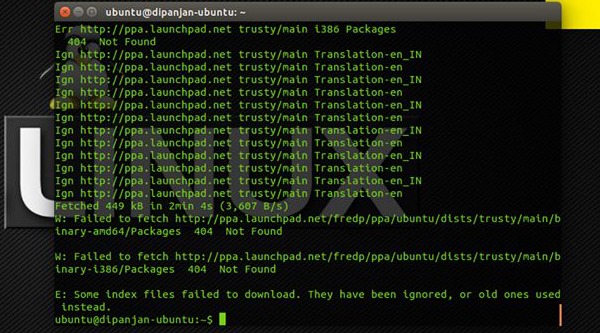
The 404 or Not Found error message is a HTTP standard response code indicating that the client was able to communicate with the server, but the server could not find what was requested. It is similar to website 404 error. The web site generates “404 – Page Not Found” web page error, when there is a broken or dead link.
What are the causes of 404 errors
There are various causes of these 404 errors in update-manager. But the important three main causes are:
- User has just upgraded and has re-enabled a PPA software-source that no longer exists
- User has manually typed in a new software source incorrectly enter image description here
- PPA was added, but the maintainer has subsequently deleted some/all of the PPA
PPAs typically are saved in either:
“/etc/apt/sources.list” or “a named file with a .list file-extension in /etc/apt/sources.list.d/”. To view the PPAs installed, in your terminal, type:
sudo gedit /etc/apt/sources.list
In the text editor, look for PPA sources, URLs that feature the ppa.launchpad.net domain. Also note that if you see a # at the front of a line of text (in sources.list) it means that it is commented out and is not checked by the package manager.
In simple words, if you type the wrong PPA address or you try to add a PPA that doesn’t provide packages for the current Ubuntu version, you’ll get a “404 Not Found” error message when you run “apt-get update” command.
These errors are much harmless, but they slow down “apt-get update” and you must disable the PPAs that cause the 404 errors.
A simple script names “fix404” checks for “404 not found” messages for all the PPAs added to the software sources. It is an easiest way to find them and to disable them. Here’s how to do this:
sudo apt-add-repository ppa:lkjoel/fix404

sudo apt-get update

sudo apt-get install fix404

sudo fix404
In case you’ve ran fix404 before the fix and get an Update Manager error, run this command in a terminal:
sudo chmod 644 /etc/apt/sources.list.d/*
Download 404 Not Found PPA
You can also try:
sudo sed -i -e 's/archive.ubuntu.com\|security.ubuntu.com/old-releases.ubuntu.com/g' /etc/apt/sources.list

sudo sed -i -e 's/archive.ubuntu.com\|security.ubuntu.com/old-releases.ubuntu.com/g' /etc/apt/sources.list.d/official-package-repositories.list

sudo sed -i -e 's/archive.ubuntu.com\|security.ubuntu.com/old-releases.ubuntu.com/g' /etc/apt/sources.list.d/official-source-repositories.list
After you’ve done the above, run the updates and then the upgrade as usually:
sudo apt-get update

sudo apt-get dist-upgrade

sudo do-release-upgrade
You must also know how to upgrade an End of Life (EOL) release of Ubuntu to a supported system.