
• Skip to primary navigation
  • Skip to main content
  • Skip to primary sidebar
Source Digit

Source Digit

Linux, Ubuntu Tutorials & News, Technology, Gadgets & Gizmos

  • Home
  • How To
  • Ubuntu
  • Instagram
  • Blogging
  • Android
  • WordPress
  • +More
    • Cloud Computing
    • Gadgets
    • Social Media
    • Technology
  • Write for Us
Home / How To / Turn Off & Disable Update Manager (Ubuntu Automatic Updates) in Ubuntu 14.04/14.10

Turn Off & Disable Update Manager (Ubuntu Automatic Updates) in Ubuntu 14.04/14.10

By Sourabh / March 21, 2015 Category: How To, Ubuntu

Turn off & disable Ubuntu Update Manager (Ubuntu Automatic Updates) in Ubuntu 14.04/14.10. Here’s how to disable Ubuntu Update Notifier from autostart (opening automatically).

Most people doesn’t know, but you can stop Update Manager (Ubuntu 14.04/14.10) from startup – turn off Ubuntu automatic updates.

Here’s how to disable the update manager popup in Linux Ubuntu systems:

Using GUI

You can either use “dconf-editor” or “software & updates” to disable the Update Manager notifications:

Using dconf-editor
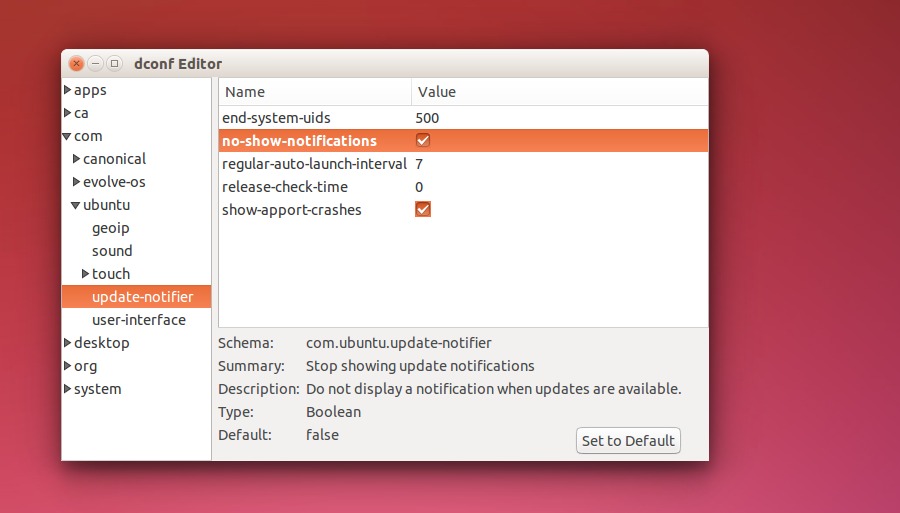
Ubuntu-Update-Dconf-02

  1. Open dconf-editor and navigate to com > ubuntu > update-notifier.
  2. Click no-show-notifications.

Using software & updates
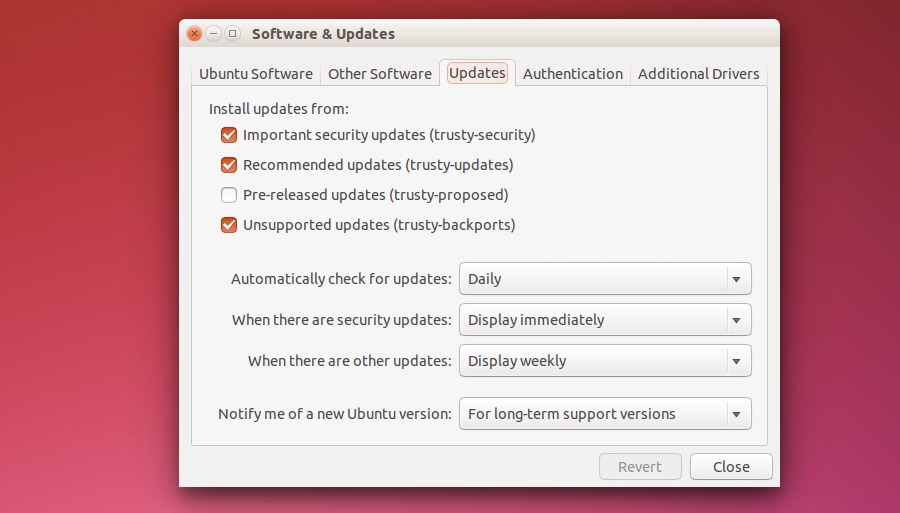
Ubuntu-Update

  1. Open the software & updates application (search software & updates in Dash and click on it).
  2. Select the “Updates” tab.
  3. For the “Automatically check for updates” option, select Never.

Using Terminal

Open the terminal (Ctrl+Alt+T) and run the following command to disable the Update Manager auto notification on Ubuntu systems:

gconftool -s --type bool /apps/update-notifier/auto_launch false

To re-enable the Update Manager auto notification, run this command:

gconftool -s --type bool /apps/update-notifier/auto_launch true

If you wish to remove the Update Manager package (auto notification) from your Ubuntu systems completely, run the following command:

sudo apt-get remove update-manager

And to restore it again, run:

sudo apt-get install update-manager

Please note that disabling Ubuntu Update Manager is not recommended. It is very important to update the Ubuntu systems at regular interval.

Tags: Disable the update manager popup?, Disable Ubuntu Automatic Updates in Ubuntu 14.04/14.10, Disable Ubuntu's Annoying Update Manager Popup, Disable Update Manager Ubuntu 14.04, Disable Update Manager Ubuntu 14.10, Disable Update Notifier from autostart, How to Remove the Annoying Update Manager Popup, How to stop (or start) update manager from startup, Make Update Manager stop opening automatically?, Stop Ubuntu 14.04 Update Manager Popup, Stop Ubuntu 14.10 Update Manager Popup, Stop Update Manager From Launching At Ubuntu Startup, Stop Update Manager Ubuntu 14.04, Turn Off & Disable Update Manager Ubuntu 14.04/14.10, Turn Off Ubuntu Automatic Updates, Turn Off Ubuntu Automatic Updates in Ubuntu 14.04/14.10, Ubuntu 14.04, Ubuntu 14.10, Update Manager not starting automatically

Primary Sidebar

Latest Posts

Delete Directory And Contents Recursively Without Prompt On Linux

Check User Login History In Ubuntu Linux Command Line

Use Locate Command To Find File In Linux Terminal By Name

How To Change Terminal Color In Ubuntu Command Line

How To Run Fsck Manually In Linux To Fix Unexpected Inconsistency

How To Fix Broken Packages On Ubuntu From Terminal

Re Execute The Previous Command In Linux Ubuntu Command Line

How Much RAM Is Needed For Ubuntu PC

How To Find Large Files And Directories In Linux Command Line

How To Use Clear Command History In Linux Terminal

© 2026 Source Digit • Linux, Ubuntu Tutorials & News, Technology, Gadgets & Gizmos

  • Home
  • About
  • Privacy Policy
  • Terms & Conditions
  • Contact Us
  • Sitemap