
• Skip to primary navigation
  • Skip to main content
  • Skip to primary sidebar
Source Digit

Source Digit

Linux, Ubuntu Tutorials & News, Technology, Gadgets & Gizmos

  • Home
  • How To
  • Ubuntu
  • Instagram
  • Blogging
  • Android
  • WordPress
  • +More
    • Cloud Computing
    • Gadgets
    • Social Media
    • Technology
  • Write for Us
Home / Uncategorized / Install MPV on Ubuntu Systems & Watch Flash Files Without Adobe Flash

Install MPV on Ubuntu Systems & Watch Flash Files Without Adobe Flash

By Sourabh / August 2, 2015 Category: Uncategorized

Watch Flash files with MPV on Ubuntu Systems. Install MPV tool for playing Adobe Flash files, to natively play video streams in Firefox and other supported web browsers. MPV is firefox browser extension that gives the user the ability to play flash video streams for multiple websites using youtube-dl and a native media player.

Since Mozilla disabled Afobe Flash for the Firefox browser, there have been many instances of Adobe Flash vulnerabilities. Luckily, you don’t need Flash on your browser to watch Flash files, you can install and use MPV on Linux Ubuntu systems.

Run the following commands in Terminal to install MPV tool on Linux Ubuntu:


$ sudo add-apt-repository ppa:mc3man/mpv-tests
$ sudo apt-get update
$ sudo apt-get install mpv

If you are not happy with the MPV tool, you can uninstall the tool by running the following command:

$ sudo apt-get remove mpv

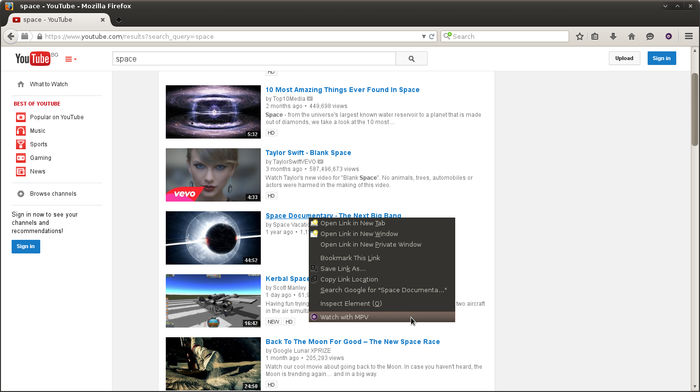
Once installed, you will need to add the Mozilla extension “Watch with MPV”.  Search for “Watch with MPV” extension on Mozilla Addons library and install it manually.

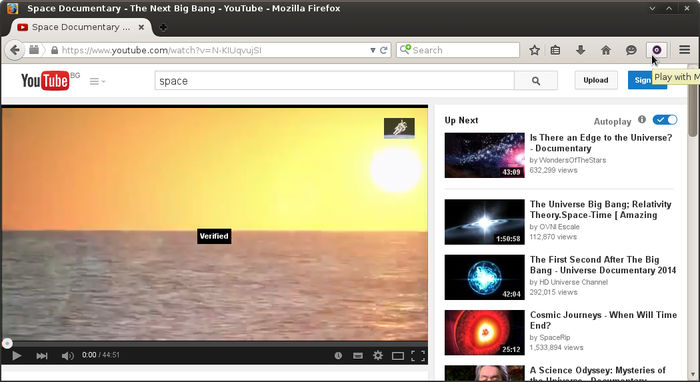
Once installed, you can use the tool. Simply press the “Play with MPV” button on the top-right corner of the browser (screenshot below).
mpv-01 mpv-021

Tags: Install MPV Addon on Ubuntu Systems, Install MPV Firefox Addon on Ubuntu Systems, Install MPV on Ubuntu Systems, Linux Ubuntu MPV Addon, MPV Addon on Linux Ubuntu, MPV Addon on Ubuntu, Ubuntu MPV Addon, Watch Flash Files Without Adobe Flash on Ubuntu

Primary Sidebar

Latest Posts

Delete Directory And Contents Recursively Without Prompt On Linux

Check User Login History In Ubuntu Linux Command Line

Use Locate Command To Find File In Linux Terminal By Name

How To Change Terminal Color In Ubuntu Command Line

How To Run Fsck Manually In Linux To Fix Unexpected Inconsistency

How To Fix Broken Packages On Ubuntu From Terminal

Re Execute The Previous Command In Linux Ubuntu Command Line

How Much RAM Is Needed For Ubuntu PC

How To Find Large Files And Directories In Linux Command Line

How To Use Clear Command History In Linux Terminal

© 2026 Source Digit • Linux, Ubuntu Tutorials & News, Technology, Gadgets & Gizmos

  • Home
  • About
  • Privacy Policy
  • Terms & Conditions
  • Contact Us
  • Sitemap