
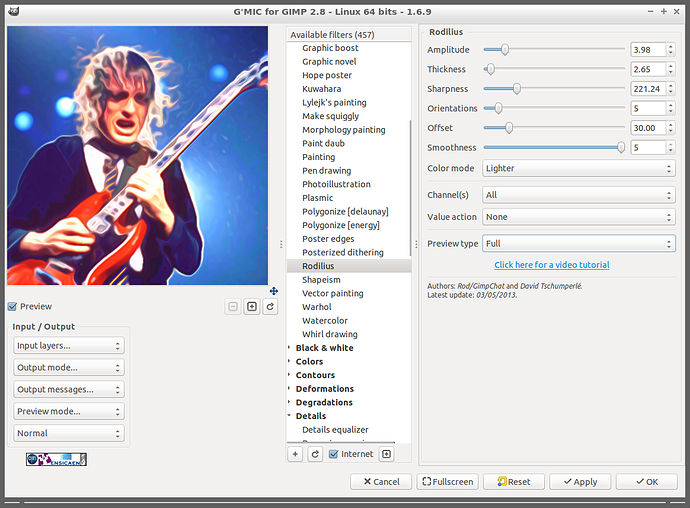
G’MIC Plugin for GIMP image editor on Linux Ubuntu. Install G’MIC 1.6.9 (GIMP Plugin) on Ubuntu 15.10, Ubuntu 15.04, Ubuntu 14.04 and Ubuntu 14.10. G’MIC is a full-featured open-source framework for image processing. It provides several different user interfaces to convert/manipulate/filter/visualize generic image datasets, ranging from 1d scalar signals to 3d+t sequences of multi-spectral volumetric images, thus including 2d color images.
These interfaces are:
- A command-line interface gmic, to use the G’MIC features from a shell. In this setting, G’MIC may be seen as a friendly companion to the ImageMagick or GraphicsMagick software suites.
- A plug-in gmic_gimp, to bring G’MIC capabilities to the image retouching software GIMP. More than 400 filters are already available, sorted by category (Artistic, Black & white, Colors, Contours, Deformations, Degradations, Details, Film emulation, Frames, Layers, Light & shadows, Patterns, Rendering, Repair, Sequences, etc.).
- A web service G’MIC Online, to allow users applying image processing algorithms on their images, directly from a web browser.
New Features:
- New command -frame_seamless and associated plug-in filter Arrays & tiles / Make seamless [patch-based]. It inserts an inner or outer frame to an input image/texture so that seams are less visible when the input image is tiled.
- New filter Deformations / Continuous droste in the GIMP plug-in. This is a direct conversion of the Droste filter written originally for Mathmap (https://www.flickr.com/groups/88221799@N00/discuss/72157601071820707/). The conversion has been done by Martin (aka Souphead).
- Martin also converted another Mathmap script, named the Kitaoka Spin Illusion.
- New filters from Andy (GarageCoder) have been moved from Testing/ into the main branch. Lot of cool filters to discover !
Improvements :
- Embedded math evaluator has been greatly improved and optimized. It now supports manipulation of vector-valued variables. Lot of new functions have been added to deal with vector/complex-valued arguments : cabs(),carg(),cexp(),clog(),cconj(),operator**,operator//, etc..
- Math evaluator also allows the user to define their own custom functions.
- String substitution by the evaluation of a math formula can be vector-valued now. For instance expression {[w,h,d]} is equivalent to expression {w},{h},{d}.
- Added support for saving bigtiff files (more than 4Gb).
Makefilehas been slightly improved (use of theCXXpre-definition).- Better management of some exceptions in the G’MIC source code.
- [gimp plug-in] : Added code to check if the dialog window is entirely visible on screen, otherwise try to reduce the preview size as much as possible.
- New mascot Gmicky designed by David Revoy8.
Bug fixes :
- When overriding variables x,y,z,c in the math parser, keep consider the original running values of x,y,z,c when accessing a pixel value with default arguments.
- Update filter command now allow first-level section names to be translated into a specific language (done for Japanese).
- Drop support of GIMP 2.6 for the G’MIC plug-in. The plug-in has been not tested on GIMP 2.6 for a while, and I doubt this is still working.
- A lot of small bug fixes !
G’MIC 1.6.9 is the latest G’MIC versions and is available to download and install, via PPA. Run the following commands in Terminal to install G’MIC 1.6.9 on Ubuntu Systems:
$ sudo add-apt-repository ppa:otto-kesselgulasch/gimp

$ sudo apt-get update

$ sudo apt-get install gmic
The G’MIC plug-in should be then available from the Filters/G’MIC.. menu entry.
- On Unix, the plug-in directory is usually located at $HOME/.gimp-2.x/plug-ins/.
- The plug-in requires these libraries installed on your system: libfftw, libfftw_threads, libpng, zlib. Use your package manager to fit these dependancies.
If you wish to remove and uninstall the G’MIC 1.6.9 plugin from Ubuntu Systems, run the command:
$ sudo apt-get remove gmic