
• Skip to primary navigation
  • Skip to main content
  • Skip to primary sidebar
Source Digit

Source Digit

Linux, Ubuntu Tutorials & News, Technology, Gadgets & Gizmos

  • Home
  • How To
  • Ubuntu
  • Instagram
  • Blogging
  • Android
  • WordPress
  • +More
    • Cloud Computing
    • Gadgets
    • Social Media
    • Technology
  • Write for Us
Home / How To / Install Linux Spotify Client 1.x (Stable) On Ubuntu Systems

Install Linux Spotify Client 1.x (Stable) On Ubuntu Systems

By Sourabh / March 14, 2016 Category: How To, Ubuntu

Linux Spotify Client 1.x (Stable Release) for Linux Ubuntu. How to install Spotify Linux Client in Ubuntu 15.04, Ubuntu 14.04, Ubuntu 14.10 and Ubuntu 15.10. The Linux Spotify Client lets you stream music on Ubuntu Systems.

Linux Spotify 1.0.23

spotify-ubuntu-linux

Known Linux specific issues in 1.0.23

  • Improper MPRIS support (there is support since 1.0.13, but limited functionality). [Linux] Spotify DBus MPRIS2 support not fully working
  • Sometimes crashes when streaming and playing local files (these very likely have more than one root cause) Linux Client crashing (segfault) on certain songs — Segfaults when playing local files
  • Improper package dependencies for installation outside Ubuntu LTS The return of the libssl trouble on Linux
  • Missing application menu
  • Missing tray icon
  • Minimize (to tray)

Install Linux Spotify Client 1.x (Stable Release)
spotify-ubuntu

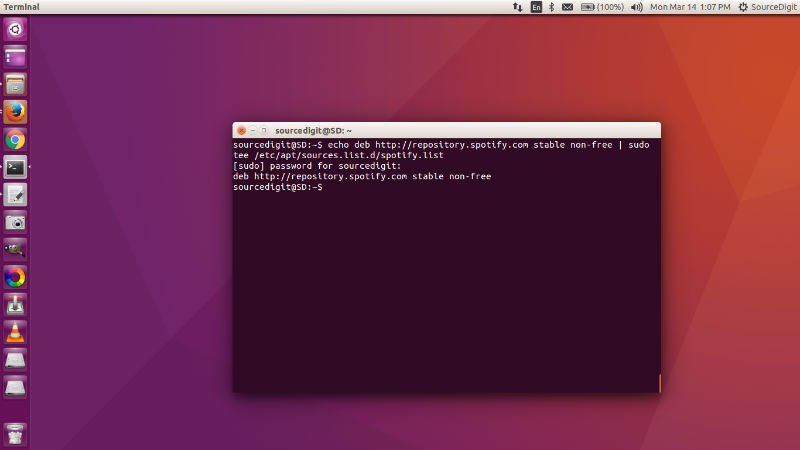
To install a client from the stable repository follow the instructions on https://www.spotify.com/download/linux/


echo deb http://repository.spotify.com stable non-free | sudo tee /etc/apt/sources.list.d/spotify.list
sudo apt-key adv --keyserver hkp://keyserver.ubuntu.com:80 --recv-keys BBEBDCB318AD50EC6865090613B00F1FD2C19886
sudo apt-get update
sudo apt-get install spotify-client

Once installed, open the Linux Spotify Client for Ubuntu Dash or Terminal. You will have to login (create a new account or use existing one) to use Spotify.

If you wish to uninstall and remove the Spotify client, run the command given below:

sudo apt-get remove spotify-client

Tags: Download Spotify In Ubuntu, Download Spotify Ubuntu 16.04, How To Install Spotify In Linux, How To Install Spotify In Ubuntu, Install Linux Spotify Client Ubuntu, Install Spotify in Ubuntu, Install Spotify In Ubuntu 14.04, Install Spotify In Ubuntu 14.10, Install Spotify in Ubuntu 15.04, Install Spotify in Ubuntu 15.10, Install Spotify In Ubuntu PPA, Install Spotify Ubuntu 16.04, Linux Spotify Client, Linux Spotify Client Ubuntu, Linux Spotify Client Ubuntu 15.04, Linux Spotify Client Ubuntu 15.10, Linux Spotify Client Ubuntu 16.04, Linux Spotify Client Ubuntu PPA, Spotify Ubuntu 16.04, Spotify Ubuntu 16.04 PPA, Spotify Ubuntu PPA, Ubuntu Linux Spotify Client, Ubuntu PPA Install Spotify, Ubuntu PPA Linux Spotify Client

Primary Sidebar

Latest Posts

How To Check User Permissions In Linux Using Command

Check Which Folder Is Taking More Space In Ubuntu Linux

How to Install Claude Desktop App in Ubuntu Linux

Job Scheduling Using At Command In Linux With Examples

How To Check Permissions Of A Directory In Linux Command

Delete Directory And Contents Recursively Without Prompt On Linux

Check User Login History In Ubuntu Linux Command Line

Use Locate Command To Find File In Linux Terminal By Name

How To Change Terminal Color In Ubuntu Command Line

How To Run Fsck Manually In Linux To Fix Unexpected Inconsistency

© 2026 Source Digit • Linux, Ubuntu Tutorials & News, Technology, Gadgets & Gizmos

  • Home
  • About
  • Privacy Policy
  • Terms & Conditions
  • Contact Us
  • Sitemap