
• Skip to primary navigation
  • Skip to main content
  • Skip to primary sidebar
Source Digit

Source Digit

Linux, Ubuntu Tutorials & News, Technology, Gadgets & Gizmos

  • Home
  • How To
  • Ubuntu
  • Instagram
  • Blogging
  • Android
  • WordPress
  • +More
    • Cloud Computing
    • Gadgets
    • Social Media
    • Technology
  • Write for Us
Home / How To / Install The Latest Nemo File Manager On Ubuntu, Via PPA

Install The Latest Nemo File Manager On Ubuntu, Via PPA

By Sourabh / October 8, 2016 Category: How To, Ubuntu

Install the latest Nemo file manager on Ubuntu, via PPA. Download and install Nemo with extensions and patches on Ubuntu Systems. Nemo lets you open as root/administrator in Ubuntu. Nemo file manager has a built in “open as root” context menu option. Best of all, it displays an “elevated privileges” banner (see screenshot below) when running as root. It also brings new extensions such as nemo-image-converter, nemo-filename-repairer, nemo-emblems, and old extension got new updates and features.
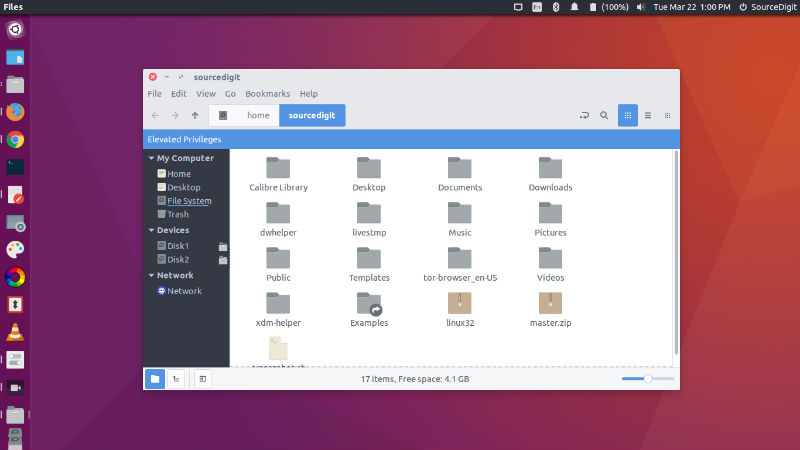
nemo-root-02

Install Nemo on Ubuntu

To install Nemo in Ubuntu Systems, run the following command to add the Nemo WebUpd8 PPA:

sudo add-apt-repository ppa:webupd8team/nemo
sudo apt-get update
sudo apt-get install nemo nemo-fileroller

Please note that if you already have an older Nemo version installed, upgrade to the latest Nemo version, Run the following command to do so:

sudo apt-get update
sudo apt-get upgrade
killall nemo

Once installed, open the Nemo file manager from the Ubuntu Dash or menu. Please note that you won’t see Nemo icon, but if you search for “Nemo”, the “Files” option shows up. Click on it to open Nemo.
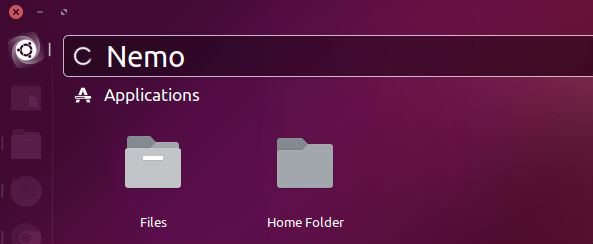
nemo-open

The Nemo file manager comes with many extensions. You can install those Nemo extensions via Ubuntu Software Center or Synaptic Manager. You can also install Nemo extensions using the command:

sudo apt-get install nemo-compare nemo-audio-tab nemo-emblems nemo-filename-repairer nemo-fileroller nemo-gtkhash nemo-image-converter nemo-media-columns nemo-pastebin python-nemo nemo-rabbitvcs nemo-seahorse nemo-share nemo-terminal

Remove Nemo Manager

If you wish to uninstall and remove Nemo file manager, run the following commands:

sudo apt-get autoremove nemo nemo-*
sudo apt-get install ppa-purge
sudo ppa-purge ppa:webupd8team/nemo

Tags: Best Linux File Manager, Caja File Manager, Download Nemo File Manager, Install Nemo File Manager, Install Nemo File Manager on Ubuntu, Install Nemo file manager on Ubuntu 14.04, Install Nemo File Manager on Ubuntu 14.10, Install Nemo file manager on Ubuntu 15.04, Install Nemo file manager on Ubuntu 15.10, Install Nemo File Manager on Ubuntu 16.04, Install Nemo With Unity Patches In Ubuntu, Nemo File Manager, Nemo File Manager Download, Nemo File Manager Elementary Os, Nemo File Manager Extensions, Nemo File Manager Install, Nemo file manager Ubuntu, Nemo File Manager Ubuntu PPA, Nemo File Manager Upgrade, Nemo File Manager Windows, Nemo Open as Administrator, Nemo Open as Administrator in Ubuntu, Nemo Open as Root, Nemo Open as Root in Ubuntu, Nemo Vs Nautilus, Ppa:Webupd8team/Nemo, Ubuntu Nemo file manager, Ubuntu Open as Administrator, Ubuntu Open as Root, Ubuntu PPA Nemo File Manager, Upgrade Nemo File Manager

Primary Sidebar

Latest Posts

Job Scheduling Using At Command In Linux With Examples

How To Check Permissions Of A Directory In Linux Command

Delete Directory And Contents Recursively Without Prompt On Linux

Check User Login History In Ubuntu Linux Command Line

Use Locate Command To Find File In Linux Terminal By Name

How To Change Terminal Color In Ubuntu Command Line

How To Run Fsck Manually In Linux To Fix Unexpected Inconsistency

How To Fix Broken Packages On Ubuntu From Terminal

Re Execute The Previous Command In Linux Ubuntu Command Line

How Much RAM Is Needed For Ubuntu PC

© 2026 Source Digit • Linux, Ubuntu Tutorials & News, Technology, Gadgets & Gizmos

  • Home
  • About
  • Privacy Policy
  • Terms & Conditions
  • Contact Us
  • Sitemap