
• Skip to primary navigation
  • Skip to main content
  • Skip to primary sidebar
Source Digit

Source Digit

Linux, Ubuntu Tutorials & News, Technology, Gadgets & Gizmos

  • Home
  • How To
  • Ubuntu
  • Instagram
  • Blogging
  • Android
  • WordPress
  • +More
    • Cloud Computing
    • Gadgets
    • Social Media
    • Technology
  • Write for Us
Home / How To / Install Kaku YouTube Music Player For Linux Ubuntu

Install Kaku YouTube Music Player For Linux Ubuntu

By Sourabh / September 5, 2016 Category: How To, Ubuntu

YouTube music player for Linux Ubuntu Desktop. Here’s how to install Kaku YouTube Desktop Music Player on Ubuntu 16.04/Ubuntu 16.10 Systems. Kaku is an online music player which supports many different platform like YouTube, Vimeo and SoundCloud… etc. With Kaku, you can easily listen to all kinds of music with just few simple clicks and don’t need to leave this desktop application.
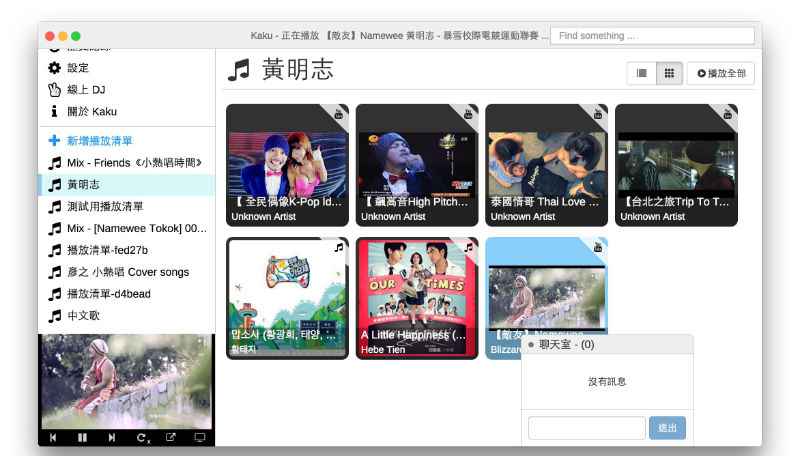
kaku-music

Kaku desktop application supports Windows, Mac OS X, Linux 32 and Linux 64.

Version 1.7 is the latest release of the Kaku music player. It has been released with the following changes:

  • Added Chomecast support, you can know cast video with chromecast
  • Added Korean translation and Čeština translation
  • Added Q&A Links
  • Added the feature to keep played tracks in History panel
  • Changed the way how shortcut works
  • Automatically update core modules when bootup
  • Updated translations for all languages
  • Several bugfixes

Visit the link given below to download Kaku YouTube Music Player for Linux

https://github.com/EragonJ/Kaku

Tags: Kaku Music Player Linux, Kaku Music Player Ubuntu, YouTube Music Player for Linux, YouTube Music Player for Linux Desktop, YouTube Music Player for Ubuntu, YouTube Music Player for Ubuntu Desktop

Primary Sidebar

Latest Posts

Delete Directory And Contents Recursively Without Prompt On Linux

Check User Login History In Ubuntu Linux Command Line

Use Locate Command To Find File In Linux Terminal By Name

How To Change Terminal Color In Ubuntu Command Line

How To Run Fsck Manually In Linux To Fix Unexpected Inconsistency

How To Fix Broken Packages On Ubuntu From Terminal

Re Execute The Previous Command In Linux Ubuntu Command Line

How Much RAM Is Needed For Ubuntu PC

How To Find Large Files And Directories In Linux Command Line

How To Use Clear Command History In Linux Terminal

© 2026 Source Digit • Linux, Ubuntu Tutorials & News, Technology, Gadgets & Gizmos

  • Home
  • About
  • Privacy Policy
  • Terms & Conditions
  • Contact Us
  • Sitemap