
Spotify Web Player for Linux Ubuntu. Install Spotify Web Player for Linux on Ubuntu 16.04 LTS. Spotify Web Player for Linux is a Node.JS application built with electron to turn Spotify’s Web Player into a local player for a stable Spotify Player for Linux replacement
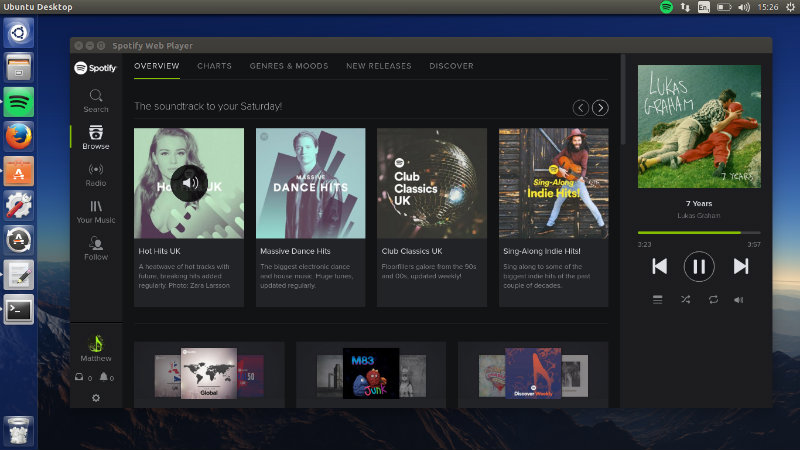
Please Note: This is not the official Spotify application and is intended as a web application. This application could potentially become broken whenever Spotify update their Web Player layout. This was created as an alternative to their Spotify Application which was becoming out-dated until recently.
Features:
- Notifications
- Tray Icon with Play, Previous, Next, Logout, and Quit functionality.
- Non-intrusive Spotify advertisements (except Spotify playback advertisements).
- D-Bus/MPRIS support
- Sing! A MusixMatch viewer integrated – sing your favourite songs from within the application
- Light theme
- Preferences – Customimize small things that can make a big difference
- Search bar linked to Ctrl+S
- Close To Tray (Minimize To Tray without the Tray Icon)
How to install Spotify Web Player for Linux
Few Linux Distors may need to make sure libappindicator-1 and libnotify4 (or alternative desktop environment packages) are installed that Electron will be able to use!
sudo apt-get install libappindicator-1 libnotify4
Next run the following commands to download the archive from GitHub and extract Spotify Web Player:
wget https://github.com/Quacky2200/Spotify-Web-Player-for-Linux/archive/master.zip

sudo mkdir -p /usr/bin/spotifywebplayer/lib/electron && sudo unzip master.zip /usr/bin/spotifywebplayer

cd /usr/bin/spotifywebplayer && . ./get_prerequisites.sh
Finally run the command given below to create application icon & application launcher:
sudo cp /usr/bin/spotifywebplayer/spotify-large-transparent.png /usr/share/pixmaps/spotify-web-player.png && sudo echo "[Desktop Entry]\nVersion=0.9.4\nName=Spotify Web Player\nComment=Music for every moment. Spotify is a digital music service that gives you access to millions of songs.\nExec=bash /usr/bin/spotifywebplayer/spotifywebplayer\nPath=/usr/bin/spotifywebplayer\nIcon=spotify-web-player\nCategories=GNOME;GTK;AudioVideo;Audio;Player;\nActions=PlayPause;Next;Previous;\nType=Application\nTerminal=false\n[Desktop Action PlayPause]\nName=Play/Pause\nExec=dbus-send --print-reply --reply-timeout=2500 --session --dest=org.mpris.MediaPlayer2.spotifywebplayer /org/mpris/MediaPlayer2 org.mpris.MediaPlayer2.Player.PlayPause\n[Desktop Action Next]\nName=Next\nExec=dbus-send --print-reply --session --dest=org.mpris.MediaPlayer2.spotifywebplayer /org/mpris/MediaPlayer2 org.mpris.MediaPlayer2.Player.Next\n[Desktop Action Previous]\nName=Previous\nExec=dbus-send --print-reply --session --dest=org.mpris.MediaPlayer2.spotifywebplayer /org/mpris/MediaPlayer2 org.mpris.MediaPlayer2.Player.Previous
Credit: https://github.com/Quacky2200/Spotify-Web-Player-for-Linux/