
• Skip to primary navigation
  • Skip to main content
  • Skip to primary sidebar
Source Digit

Source Digit

Linux, Ubuntu Tutorials & News, Technology, Gadgets & Gizmos

  • Home
  • How To
  • Ubuntu
  • Instagram
  • Blogging
  • Android
  • WordPress
  • +More
    • Cloud Computing
    • Gadgets
    • Social Media
    • Technology
  • Write for Us
Home / How To / Audacious 3.8.2 Released; Install Audacious Player On Ubuntu

Audacious 3.8.2 Released; Install Audacious Player On Ubuntu

By Sourabh / February 6, 2017 Category: How To, Ubuntu

Install Audacious Player 3.8.2 in Ubuntu 16.10 and Ubuntu 16.04 and Linux Mint Systems. Audacious Player 3.8.2 is a very small release with fixes for bug #691 and the vulnerability recently discovered in Game_Music_Emu.

Audacious is an open source audio player for Linux Ubuntu Systems. A descendant of XMMS, Audacious plays your music how you want it, without stealing away your computer’s resources from other tasks. Users can easily drag and drop folders and individual song files, search for artists and albums in your entire music library, or create and edit your own custom playlists. They can listen to CD’s or stream music from the Internet. For a more mesmerizing audio effect, the sound can be tweaked using the graphical equalizer. For karaoke or other purposes, the plugins can be included with Audacious to fetch lyrics for the music. Audacious music player can also be used as an alarm in the morning, and more.
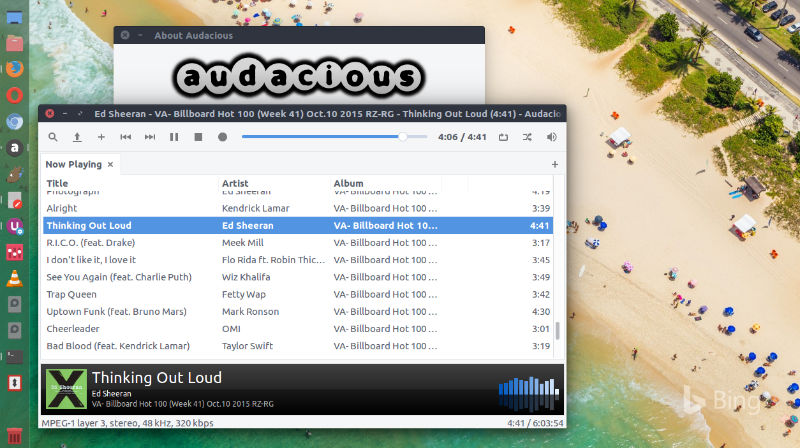
Install Audacious 3.8.2

Ubuntu users can install Audacious 3.8.2 via WebUpd8 PPA. To add this PPA and install Audacious 3.8.1 on Ubuntu Systems, simply run the following commands in terminal:

$ sudo add-apt-repository ppa:nilarimogard/webupd8
$ sudo apt-get update
$ sudo apt install audacious audacious-plugins

Packages in this PPA: audacious, ap-hotspot, awn-applet-radio, awn-applet-wm, calise, cmus, dockbarx, dockbarx-themes-extra, dropbox-share, emerald, exaile, fbmessenger, gnome-subtitles, gnome-window-applets, grsync, grive, gthumb, launchpad-getkeys, mc, mdm (Mint Display Manager), minitunes, minitube, musique, notifyosdconfig, nautilus-columns, powertop, ppa-purge, rosa-media-player, fixed pulseaudio-equalizer, subtitleeditor, syncwall, umplayer, unity-reboot, wimlib, youtube-dl, xfce4-dockbarx-plugin, xournal, yad, yarock and others. Almost all packages are updated to their latest version.

Once installed, open Audacious 3.8.2 from Ubuntu Dash or Terminal.

Tags: Audacious 3.8.2, Audacious 3.8.2 Audio Player, Audacious 3.8.2 MP3 PLayer, Audacious 3.8.2 Music Player, Audacious 3.8.2 Ubuntu, Audacious 3.8.2 Ubuntu 14.04, Audacious 3.8.2 Ubuntu 15.04, Audacious 3.8.2 Ubuntu 16.04, Audacious 3.8.2 Ubuntu 16.10, Audacious 3.8.2 Ubuntu PPA, Audacious Audio Player, Audacious Audio Player Ubuntu, Audacious MP3 PLayer, Audacious MP3 Player Ubuntu, Audacious Music Player, Audacious Music Player Ubuntu, Audacious Player 3.8.2, Audacious Player 3.8.2 Ubuntu, Audacious Player 3.8.2 Ubuntu PPA, Download Audacious 3.8.2 Ubuntu, Download Audacious Player 3.8.2 Ubuntu, Install Audacious 3.8.2 Ubuntu, Install Audacious Audio Player Ubuntu, Install Audacious MP3 PLayer Ubuntu, Install Audacious Music Player Ubuntu, Install Audacious Player 3.8.2 in Ubuntu, Install Audacious Player 3.8.2 Ubuntu, Ubuntu 14.04 Audacious 3.8.2, Ubuntu 15.04 Audacious 3.8.2, Ubuntu 16.04 Audacious 3.8.2, Ubuntu 16.10 Audacious 3.8.2, Ubuntu Audacious 3.8.2, Ubuntu Audacious Audio Player, Ubuntu Audacious MP3 PLayer, Ubuntu Audacious Music Player, Ubuntu Audacious Player 3.8.2, Ubuntu PPA Audacious 3.8.2, Ubuntu PPA Audacious Player 3.8.2

Primary Sidebar

Latest Posts

Job Scheduling Using At Command In Linux With Examples

How To Check Permissions Of A Directory In Linux Command

Delete Directory And Contents Recursively Without Prompt On Linux

Check User Login History In Ubuntu Linux Command Line

Use Locate Command To Find File In Linux Terminal By Name

How To Change Terminal Color In Ubuntu Command Line

How To Run Fsck Manually In Linux To Fix Unexpected Inconsistency

How To Fix Broken Packages On Ubuntu From Terminal

Re Execute The Previous Command In Linux Ubuntu Command Line

How Much RAM Is Needed For Ubuntu PC

© 2026 Source Digit • Linux, Ubuntu Tutorials & News, Technology, Gadgets & Gizmos

  • Home
  • About
  • Privacy Policy
  • Terms & Conditions
  • Contact Us
  • Sitemap