
• Skip to primary navigation
  • Skip to main content
  • Skip to primary sidebar
Source Digit

Source Digit

Linux, Ubuntu Tutorials & News, Technology, Gadgets & Gizmos

  • Home
  • How To
  • Ubuntu
  • Instagram
  • Blogging
  • Android
  • WordPress
  • +More
    • Cloud Computing
    • Gadgets
    • Social Media
    • Technology
  • Write for Us
Home / How To / How To Create Shutdown Shortcut In Ubuntu

How To Create Shutdown Shortcut In Ubuntu

By Sourabh / March 15, 2024 Category: How To

How to create shutdown shortcut in Ubuntu? Read this tutorial to find out how to add shutdown button to taskbar in Linux Ubuntu Systems.

Ubuntu users can add shutdown, logout, restart buttons using Power Commands. This tool is very useful and has a set of launcher that help you to run elementary tasks in your desktop environment.

The Power Command can be used to create shortcut buttons for:

  • Suspend. Suspend mode. A special low power mode, that preserves the content of RAM while converving power.
  • Hibernate. Hibernate mode. Everything is saved. There is not power consumption. Not work in all the devices.
  • Logout. Exit from current session.
  • Restart. Restart the device.
  • Shutdown. Power off the device.
  • Screensaver. Launch the screensaver.
  • Lock. Lock the device. You must enter the password to re-enter in the current session.
  • Kill. Kill a graphical application. You must see a cross, click with it in the app you want to end.
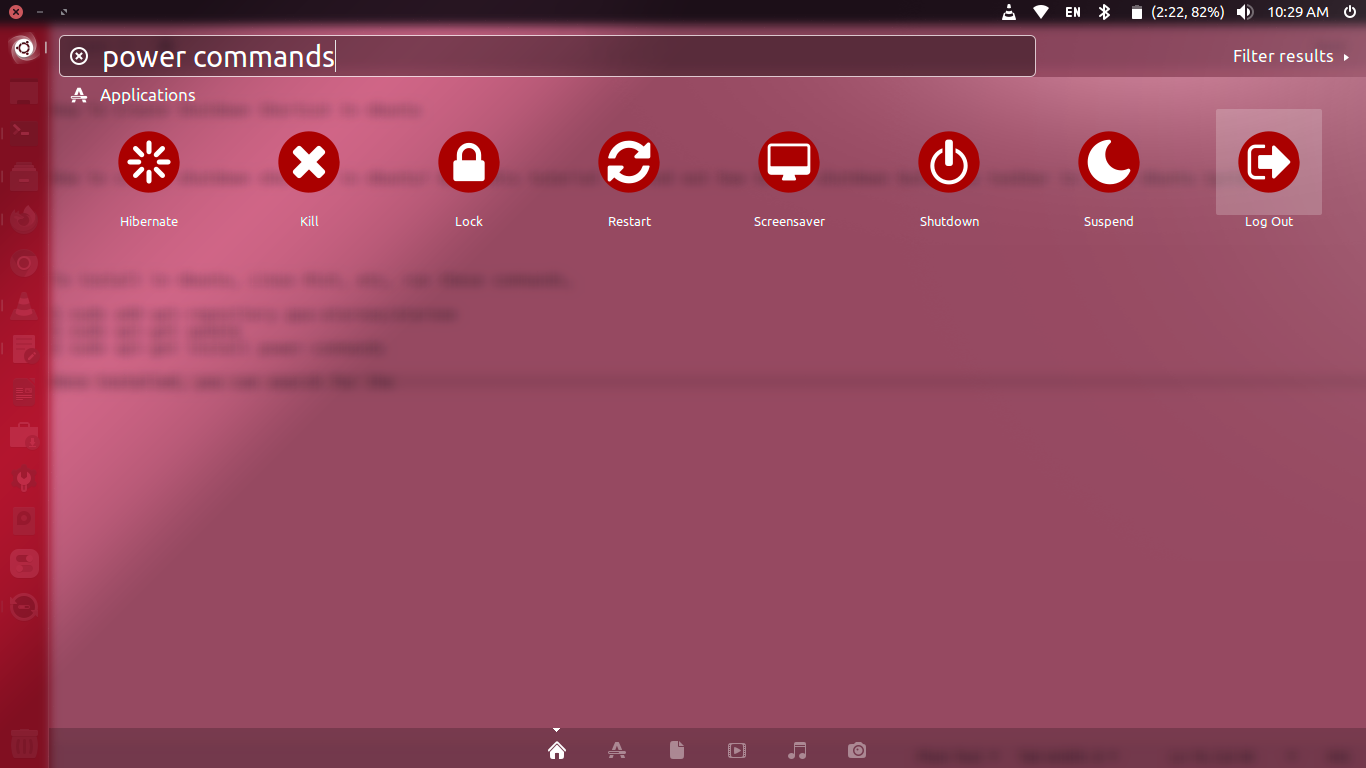
To install in Ubuntu, Linux Mint, etc, run these commands,

$ sudo add-apt-repository ppa:atareao/atareao
$ sudo apt-get update
$ sudo apt-get install power-commands

Once installed, you can search for the “power commands” in Ubuntu dash or search for specific options such as Suspend, Hibernate, Logout, Restart, Shutdown, Screensaver, Lock and Kill.

Primary Sidebar

Latest Posts

How To Check User Permissions In Linux Using Command

Check Which Folder Is Taking More Space In Ubuntu Linux

How to Install Claude Desktop App in Ubuntu Linux

Job Scheduling Using At Command In Linux With Examples

How To Check Permissions Of A Directory In Linux Command

Delete Directory And Contents Recursively Without Prompt On Linux

Check User Login History In Ubuntu Linux Command Line

Use Locate Command To Find File In Linux Terminal By Name

How To Change Terminal Color In Ubuntu Command Line

How To Run Fsck Manually In Linux To Fix Unexpected Inconsistency

© 2026 Source Digit • Linux, Ubuntu Tutorials & News, Technology, Gadgets & Gizmos

  • Home
  • About
  • Privacy Policy
  • Terms & Conditions
  • Contact Us
  • Sitemap