
• Skip to primary navigation
  • Skip to main content
  • Skip to primary sidebar
Source Digit

Source Digit

Linux, Ubuntu Tutorials & News, Technology, Gadgets & Gizmos

  • Home
  • How To
  • Ubuntu
  • Instagram
  • Blogging
  • Android
  • WordPress
  • +More
    • Cloud Computing
    • Gadgets
    • Social Media
    • Technology
  • Write for Us
Home / How To / Install FF Multi Converter in Ubuntu 14.04/14.10 – Convert Audio/Video/Image/Documents in Ubuntu

Install FF Multi Converter in Ubuntu 14.04/14.10 – Convert Audio/Video/Image/Documents in Ubuntu

By Sourabh / March 17, 2015 Category: How To, Ubuntu

How to convert audio/video/image files in Ubuntu. Install FF Multi Converter in Ubuntu 14.04/14.10. Convert audio, video, image and documents/files with FF Multi Converter.

FF Multi Converter is a simple graphical application which enables you to convert audio, video, image and document files between all popular formats, using and combining other programs. It uses ffmpeg for audio/video files, unoconv for document files and ImageMagick for image file conversions.ffmulticonverter-screen1
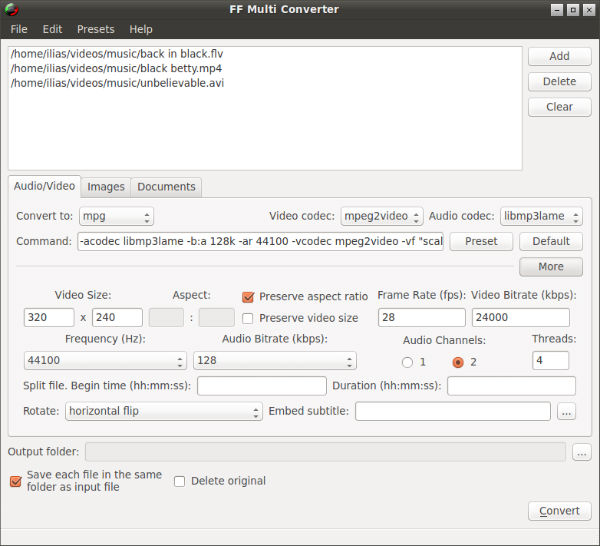
The goal of FF Multi Converter is to gather the most popular multimedia types in one application and provide conversion options for them easily through a user-friendly interface.

FF Multi Converter 1.7 has been released with a new user interface and various new features. It now allows users to select multiple files and supports drag and drop via file manager.

FF Multi Converter application supports the following formats:

  • Audio/Video: aac, ac3, afc, aiff, amr, asf, au, avi, dvd, flac, flv, mka, mkv, mmf, mov, mp3, mp4, mpg, ogg, ogv, psp, rm, spx, vob, wav, webm, wma, wmv;
  • Image: bmp, cgm, dpx, emf, eps, fpx, gif, jbig, jng, jpeg, mrsid, p7, pdf, picon, png, ppm, psd, rad, tga, tif, webp, xpm;
  • Documents: doc > odt, pdf; html > odt; odp > pdf, ppt; ods > pdf; odt > doc, html, pdf, rtf, sxw, txt, xml; ppt > odp; rtf > odt; sdw > odt; sxw > odt; txt -> odt; xls > ods; xml > doc, odt, pdf.

Install FF Multi Converter in Ubuntu

Ubuntu users can install the latest FF Multi Converter by using its stable PPA. Add the PPA and install it using the following commands:

sudo add-apt-repository ppa:ffmulticonverter/stable
sudo apt-get update
sudo apt-get install ffmulticonverter

Arch Linux users can download and install FF Multi Converter via AUR. To install it on other Linux distros, visit FF Multi Converter download page.

Tags: Convert Audio With FF Multi Converter, Convert Document Files With FF Multi Converter, Convert Files on Linux Ubuntu 14.04, Convert Files on Linux Ubuntu 14.10, Convert Files Using FF Multi Converter, Convert Image With FF Multi Converter, Convert Video With FF Multi Converter, Install FF Multi Converter, Install FF Multi Converter on Ubuntu 14.10, Install FF Multi Converter on Ubuntu 14.40, Linux Ubuntu Install FF Multi Converter, Ubuntu 14.04, Ubuntu 14.10

Primary Sidebar

Latest Posts

How To Run Fsck Manually In Linux To Fix Unexpected Inconsistency

How To Fix Broken Packages On Ubuntu From Terminal

Re Execute The Previous Command In Linux Ubuntu Command Line

How Much RAM Is Needed For Ubuntu PC

How To Find Large Files And Directories In Linux Command Line

How To Use Clear Command History In Linux Terminal

Linux Command To Check RAM Size In Ubuntu Terminal In GB

How To Install Proprietary Drivers In Linux Ubuntu Using Terminal

How To Shutdown Linux With A 15 Minute Delay And Message

Free AI Courses With Certificate For Beginners In India

© 2026 Source Digit • Linux, Ubuntu Tutorials & News, Technology, Gadgets & Gizmos

  • Home
  • About
  • Privacy Policy
  • Terms & Conditions
  • Contact Us
  • Sitemap