
• Skip to primary navigation
  • Skip to main content
  • Skip to primary sidebar
Source Digit

Source Digit

Linux, Ubuntu Tutorials & News, Technology, Gadgets & Gizmos

  • Home
  • How To
  • Ubuntu
  • Instagram
  • Blogging
  • Android
  • WordPress
  • +More
    • Cloud Computing
    • Gadgets
    • Social Media
    • Technology
  • Write for Us
Home / How To / How To Install Fedy (Fedora Utils) On Fedora 22 Desktop

How To Install Fedy (Fedora Utils) On Fedora 22 Desktop

By Sourabh / June 2, 2015 Category: How To, Ubuntu

Customize Fedora 22 Desktop. Install Fedy (Fedora Utils) on Fedora 22 and tweak your Fedora Desktop. Fedy (Fedora Utils) is a post-installation script written in bash for Fedora Desktop.

Fedy is a wonderul tool which enables a standard Fedora installation with additional applications, utilities, codecs and much more. Fedy can be used to install and configure lots of application and codecs that are not shipped by Fedora.
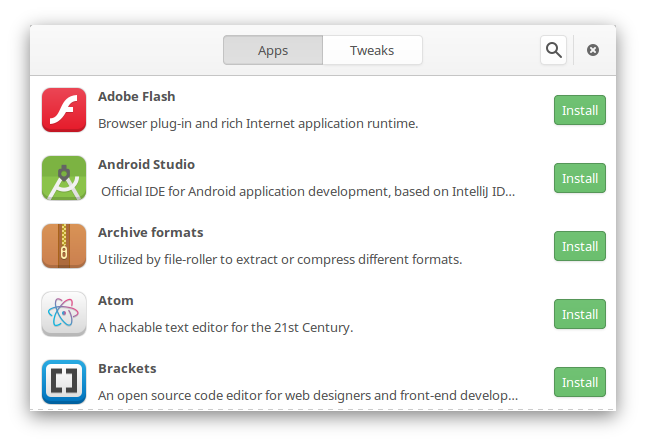
fedy

Fedy has a simple but powerful Front End User Interface, completely written in GTK3. It lists information about installed and not installed packages on Fedora system. The installation process on Fedy run in background even when the front end is closed. If something goes awry and you are not happy with the process, you can revert back and undo task.

The latest version of Fedy available is Fedy 4.0 and it supports Fedora 22, released on 26 May 2015. To install Fedy in Fedora, open Terminal and run the following command:


su -c "curl https://satya164.github.io/fedy/fedy-installer -o fedy-installer && chmod +x fedy-installer && ./fedy-installer"

Once installed, you can open Fedy either from menu or from terminal.

Tags: Customize Fedora 22 Desktop, Fedora 22 Desktop, Fedora 22 Desktop Customization, Fedy - Tweak your Fedora, Fedy (Fedora Utils), How To Install Fedy (Fedora Utils) On Fedora 22 Desktop, Install Fedy Tool Fedora 22 Desktop, Install Fedy with DNF on Fedora 22, Tweak Fedora 22 Desktop, Tweak Fedora 22 Desktop Using Fedy

Primary Sidebar

Latest Posts

Delete Directory And Contents Recursively Without Prompt On Linux

Check User Login History In Ubuntu Linux Command Line

Use Locate Command To Find File In Linux Terminal By Name

How To Change Terminal Color In Ubuntu Command Line

How To Run Fsck Manually In Linux To Fix Unexpected Inconsistency

How To Fix Broken Packages On Ubuntu From Terminal

Re Execute The Previous Command In Linux Ubuntu Command Line

How Much RAM Is Needed For Ubuntu PC

How To Find Large Files And Directories In Linux Command Line

How To Use Clear Command History In Linux Terminal

© 2026 Source Digit • Linux, Ubuntu Tutorials & News, Technology, Gadgets & Gizmos

  • Home
  • About
  • Privacy Policy
  • Terms & Conditions
  • Contact Us
  • Sitemap