
• Skip to primary navigation
  • Skip to main content
  • Skip to primary sidebar
Source Digit

Source Digit

Linux, Ubuntu Tutorials & News, Technology, Gadgets & Gizmos

  • Home
  • How To
  • Ubuntu
  • Instagram
  • Blogging
  • Android
  • WordPress
  • +More
    • Cloud Computing
    • Gadgets
    • Social Media
    • Technology
  • Write for Us
Home / How To / How to Install Skype Web Client in Ubuntu

How to Install Skype Web Client in Ubuntu

By Sourabh / September 16, 2015 Category: How To, Ubuntu

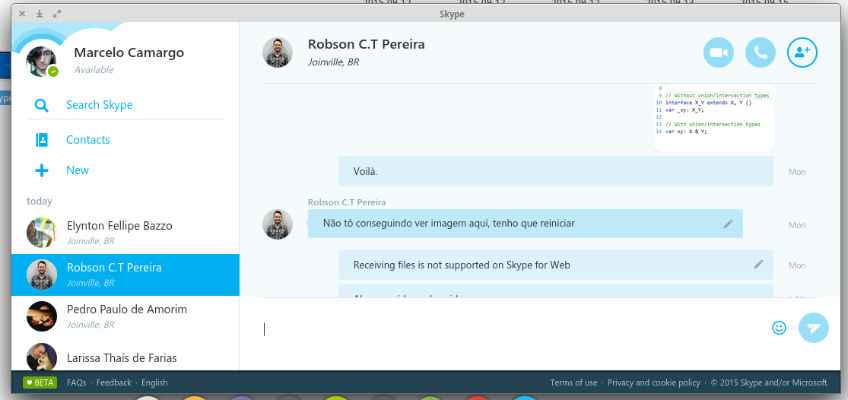
Download Skype for Linux. Install Skype on Ubuntu 15.04 and Ubuntu 14.04. Install Skype unofficial client for Linux Systems. Skype unofficial client is an unofficial client of Skype for Linux, running on top of Node Webkit.
skype-ubuntu

Using the Skype for Linux application, you can make free instant messages to your friends, family and colleagues. Make Skype to Skype calls and Video call your contacts.

To install Skype unofficial client on Ubuntu Systems, run the following commands in Terminal


git clone https://github.com/haskellcamargo/skype-unofficial-client.git
cd skype-unofficial-client

For 32 Bit Ubuntu Systems

sudo make linux_x86

For 64 Bit Ubuntu Systems

sudo make linux_x64

Once installed, the Skype unofficial client can be opened/started from Ubuntu menu or via /opt/skype_unofficial_client/skype command.

If you aren’t happy with the Skype unofficial client, you can uninstall and remove it by running the commands given below:

sudo rm -R /opt/skype_unofficial_client/
sudo rm /usr/share/applications/Skype.desktop
sudo rm /usr/bin/skype-desktop

If you need further information about the Skype unofficial client, please visit – https://github.com/haskellcamargo/skype-unofficial-client

Tags: How to Install Skype Web Client in Ubuntu, Install Skype in Ubuntu, Install Skype Web Client in Ubuntu, Skype Ubuntu, Ubuntu Skype

Primary Sidebar

Latest Posts

Re Execute The Previous Command In Linux Ubuntu Command Line

How Much RAM Is Needed For Ubuntu PC

How To Find Large Files And Directories In Linux Command Line

How To Use Clear Command History In Linux Terminal

Linux Command To Check RAM Size In Ubuntu Terminal In GB

How To Install Proprietary Drivers In Linux Ubuntu Using Terminal

How To Shutdown Linux With A 15 Minute Delay And Message

Free AI Courses With Certificate For Beginners In India

Best AI Plugins For WordPress To Use In 2026

3 Commands To Check USB Connection In Linux Terminal

© 2026 Source Digit • Linux, Ubuntu Tutorials & News, Technology, Gadgets & Gizmos

  • Home
  • About
  • Privacy Policy
  • Terms & Conditions
  • Contact Us
  • Sitemap