
• Skip to primary navigation
  • Skip to main content
  • Skip to primary sidebar
Source Digit

Source Digit

Linux, Ubuntu Tutorials & News, Technology, Gadgets & Gizmos

  • Home
  • How To
  • Ubuntu
  • Instagram
  • Blogging
  • Android
  • WordPress
  • +More
    • Cloud Computing
    • Gadgets
    • Social Media
    • Technology
  • Write for Us
Home / How To / Take A Break On Ubuntu, An App That Helps You To Actually Take A Break

Take A Break On Ubuntu, An App That Helps You To Actually Take A Break

By Sourabh / December 17, 2015 Category: How To, Ubuntu

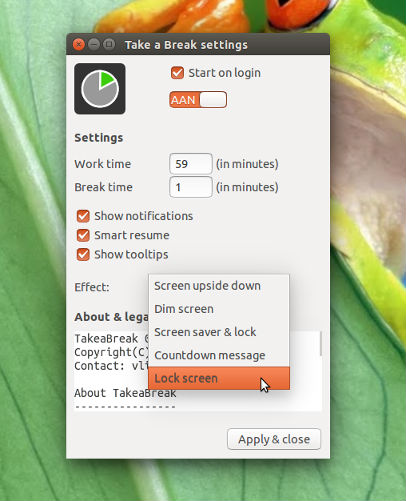
Install Take A Break app on Linux Ubuntu 15.10, Ubuntu 14.04 and Derivatives. Take a Break is a small application to force users (gently) to take periodical breaks, to prevent spending too much time in one session.
takeabreak

The application divides time in two sections: up-time and break-time. After the up-time has passed, the computer switches to another state (either screen upside-down, dimmed, screen saver etc etc). The application was initiated by a question on Askubuntu, now moved to Launchpad for further development, which would be out of the scope of AU.

Take a Break App has many exciting features such as notifications for start and stop. It also notifies for upcoming breaks. The app features smart resume function. The app starts counting the time when the user actually starts working again. The app supports toggle mode to take a break that can be switched on/off.

Install Take a Break on Ubuntu

Take a Break can be installed in Ubuntu, via PPA by running the following command:

$ sudo add-apt-repository ppa:vlijm/takeabreak
$ sudo apt-get update
$ sudo apt-get install takeabreak

Once installed, open the app via Ubuntu Dash.

If you want to uninstall and remove Take a Break App, run the following command in Terminal:

$ sudo apt-get remove takeabreak

Tags: Install Take a Break on Ubuntu, Install Take a Break on Ubuntu 14.04, Install Take a Break on Ubuntu 14.10, Install Take a Break on Ubuntu 15.04, Install Take a Break on Ubuntu 15.10, Take a Break Ubuntu, Take a Break Ubuntu PPA, Ubuntu Install Take a Break, Ubuntu PPA Take a Break

Primary Sidebar

Latest Posts

Delete Directory And Contents Recursively Without Prompt On Linux

Check User Login History In Ubuntu Linux Command Line

Use Locate Command To Find File In Linux Terminal By Name

How To Change Terminal Color In Ubuntu Command Line

How To Run Fsck Manually In Linux To Fix Unexpected Inconsistency

How To Fix Broken Packages On Ubuntu From Terminal

Re Execute The Previous Command In Linux Ubuntu Command Line

How Much RAM Is Needed For Ubuntu PC

How To Find Large Files And Directories In Linux Command Line

How To Use Clear Command History In Linux Terminal

© 2026 Source Digit • Linux, Ubuntu Tutorials & News, Technology, Gadgets & Gizmos

  • Home
  • About
  • Privacy Policy
  • Terms & Conditions
  • Contact Us
  • Sitemap