
Get ready for a brand new Ubuntu Linux Terminal experience. Canonical’s planed Terminal design improvements promises at ways of making the Terminal app more pleasing, in terms of the user experience, as well as the visuals.
Get ready for a brand new Ubuntu Linux Terminal experience. Canonical’s planed Terminal design improvements promises at ways of making the Terminal app more pleasing, in terms of the user experience, as well as the visuals.
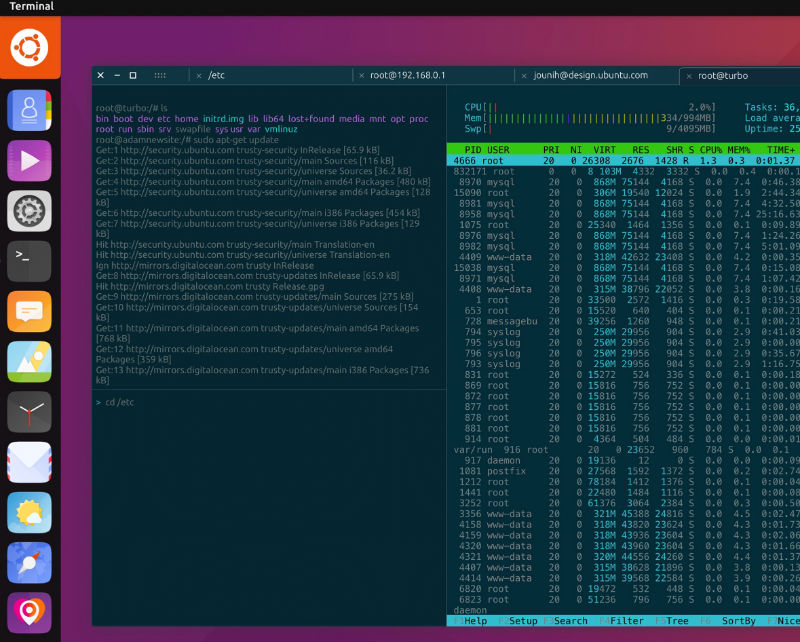
The most striking change will be on the visual side. Canonical has brought the app in line with their well-known Suru visual language concept. They have also plans to adopt the Solarized palette as the default palette , which can be completely customised by the user.
On the functionality side, Canonical plans a number of improvements to the current Terminal. For example, the upcoming Terminal improvements will bring:
- Keyboard shortcuts
- Ability to completely customise touch/keyboard shortcuts
- Ability to split the screen horizontally/vertically (similar to Terminator)
- Ability to easily customise the palette colours, and window transparency (on desktop)
- Unlimited history/scrollback
- Adding a “find” action for searching the history
Tabs and Split Screen
On larger screens, Terminal tabs will be visually persistent and more accurate. Users will be able split a Terminal panel horizontally and vertically, and use keyboard shortcuts or mouse/touch to move between the focused tabs and split screen panels.
Shortcuts and Commands
The new Terminal will bring quick mobile access to shortcuts and commands with the option of having modifier (Ctrl, Alt etc) keys working together with the on-screen keyboard on touch. Canonical also plans to enable the ability to add own custom key shortcuts and commands by the users.
If you are interested in making Terminal a much better one, please contribute. Users can read more on how to contribute at http://design.canonical.com/2016/08/convergent-terminal