
• Skip to primary navigation
  • Skip to main content
  • Skip to primary sidebar
Source Digit

Source Digit

Linux, Ubuntu Tutorials & News, Technology, Gadgets & Gizmos

  • Home
  • How To
  • Ubuntu
  • Instagram
  • Blogging
  • Android
  • WordPress
  • +More
    • Cloud Computing
    • Gadgets
    • Social Media
    • Technology
  • Write for Us
Home / How To / Install Temps Weather App On Linux Ubuntu Desktop

Install Temps Weather App On Linux Ubuntu Desktop

By Sourabh / November 10, 2016 Category: How To, Ubuntu

Temps an open source weather app for Linux Ubuntu Systems. Temps is a minimalistic weather menubar application for Ubuntu Desktop that displays an actual weather information on Ubuntu Desktop. It show four-day weather forecast for any location in the world. Temps uses code from several open source projects like Electron, Menubar, Chart.js and OpenWeatherMap.
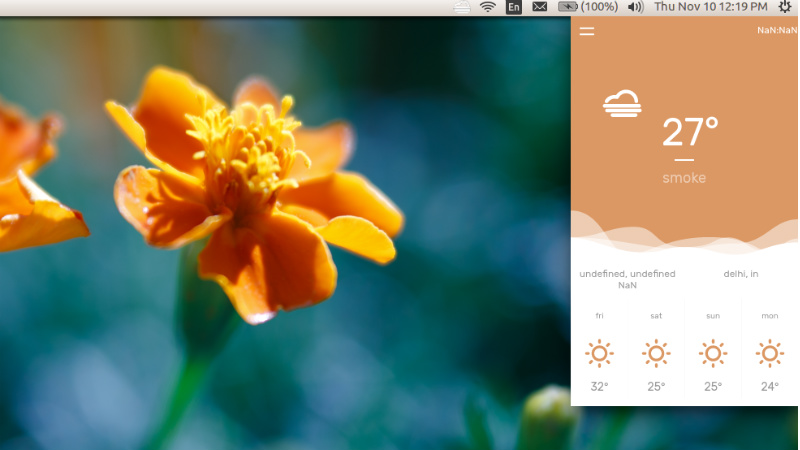
temps-weather

Temps is a lightweight and minimalistic weather menubar application for any desktop.

  • Actual weather information for any location
  • Four-Day weather forecast
  • Interactive hourly weather graph
  • Timezone & Geolocation support
  • Information directly in your menubar available
  • Rain, snow and thunder animation
  • Minimal and colorful design
  • Free

Download and Install Temps on Ubuntu

Download the package from the official Temps website and just extract the .zip folder and double-click on the ‘temps’ executable file inside to run the application.

Please be cautious to note that the Temps icon will not be visible on Dark Ubuntu Themes (as itself is dark in colour that hides in the panel bar). Also the Temps app only opens when you click on its icon in the panel bar. When you click away anywhere on the screen, the application closes.

The credit for the post goes to OMG Ubuntu. The post was first published on http://omgubuntu.co.uk/

Tags: Linux Temps Weather App, Temps Open Source Weather App, Temps Weather App, Temps Weather App Linux, Temps Weather App Ubuntu, Ubuntu Temps Weather App

Primary Sidebar

Latest Posts

Delete Directory And Contents Recursively Without Prompt On Linux

Check User Login History In Ubuntu Linux Command Line

Use Locate Command To Find File In Linux Terminal By Name

How To Change Terminal Color In Ubuntu Command Line

How To Run Fsck Manually In Linux To Fix Unexpected Inconsistency

How To Fix Broken Packages On Ubuntu From Terminal

Re Execute The Previous Command In Linux Ubuntu Command Line

How Much RAM Is Needed For Ubuntu PC

How To Find Large Files And Directories In Linux Command Line

How To Use Clear Command History In Linux Terminal

© 2026 Source Digit • Linux, Ubuntu Tutorials & News, Technology, Gadgets & Gizmos

  • Home
  • About
  • Privacy Policy
  • Terms & Conditions
  • Contact Us
  • Sitemap