
• Skip to primary navigation
  • Skip to main content
  • Skip to primary sidebar
Source Digit

Source Digit

Linux, Ubuntu Tutorials & News, Technology, Gadgets & Gizmos

  • Home
  • How To
  • Ubuntu
  • Instagram
  • Blogging
  • Android
  • WordPress
  • +More
    • Cloud Computing
    • Gadgets
    • Social Media
    • Technology
  • Write for Us
Home / How To / Save Terminal Output To File in Ubuntu Linux

Save Terminal Output To File in Ubuntu Linux

By Sourabh / July 26, 2022 Category: How To, Ubuntu

Learn how to save terminal output to file in Linux Ubuntu and how to save terminal commands in Linux. Users can also save terminal session to file in Linux.

Save Terminal Output To File Using Redirects

Ubuntu users can save the terminal output using the STDOUT redirection operator > for redirecting/saving the output to a file. These in-built operators of the UNIX shell are default functions in Linux that can redirect the text output of a program to a file.

There are three STDOUT operators that can be used:

  1. The > redirects the command output to a file replacing any existing content on the file. The > operator will either generate a new file or replace the contents of a file with the output of the program.
  2. The >> redirects adds the command output at the end of the existing content of the file (if any).
  3. The 2> operator is a special kind of operator that will print errors reported back. This is highly useful for debugging.
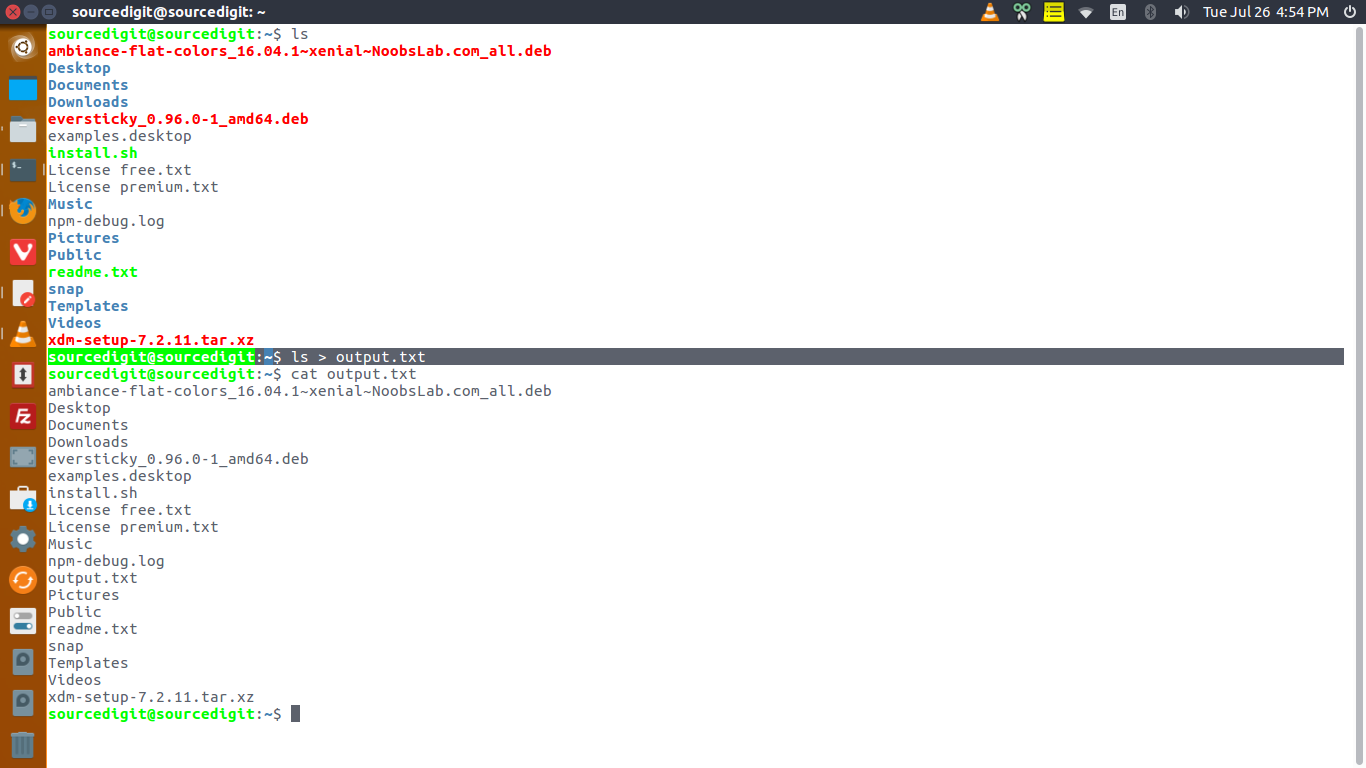
In the example above, the > redirect saves the output of ls -l command to a text file named output.txt.

Primary Sidebar

Latest Posts

Delete Directory And Contents Recursively Without Prompt On Linux

Check User Login History In Ubuntu Linux Command Line

Use Locate Command To Find File In Linux Terminal By Name

How To Change Terminal Color In Ubuntu Command Line

How To Run Fsck Manually In Linux To Fix Unexpected Inconsistency

How To Fix Broken Packages On Ubuntu From Terminal

Re Execute The Previous Command In Linux Ubuntu Command Line

How Much RAM Is Needed For Ubuntu PC

How To Find Large Files And Directories In Linux Command Line

How To Use Clear Command History In Linux Terminal

© 2026 Source Digit • Linux, Ubuntu Tutorials & News, Technology, Gadgets & Gizmos

  • Home
  • About
  • Privacy Policy
  • Terms & Conditions
  • Contact Us
  • Sitemap