
How to install a .deb package / file in Linux Ubuntu. You can manually install .deb packages via the command line. The dpkg command (Debian Package Management System) is used to installed .deb Packages. dpkg command (Debian Package Management System) The dpkg command is a package manager from shell for Debian and Ubuntu Linux systems. […]
How To
How-to tutorials for Ubuntu, Linux, Android, WordPress, websites and more. Learn about Ubuntu Linux how to solve problems, errors, manage updates, fix issues and add functions & features.
How To Install Systemback 1.2 On Ubuntu 14.10, Ubuntu 14.04 & Derivatives
Install Systemback on Ubuntu 14.10/14.04. Systemback is a system backup and restore application for Linux Ubuntu Systems. Systemback can be used to create Ubuntu system backups and restore Ubuntu system (users configuration files). Systemback makes it easy to create backups and easily restore the previous state of the Linux Ubuntu system. It comes with few […]
How to Schedule Your Posts in WordPress

How to schedule WordPress posts. Learn how to schedule blog posts in WordPress. Easily schedule WordPress posts and control when the WordPress blog post gets published. WordPress has a built-in WordPress post scheduler feature which can help you to add a publish time for your WordPress blog posts. Lest us see how: How to schedule […]
Add the Forget Button in Firefox 35 & Delete Browsing History Instantly
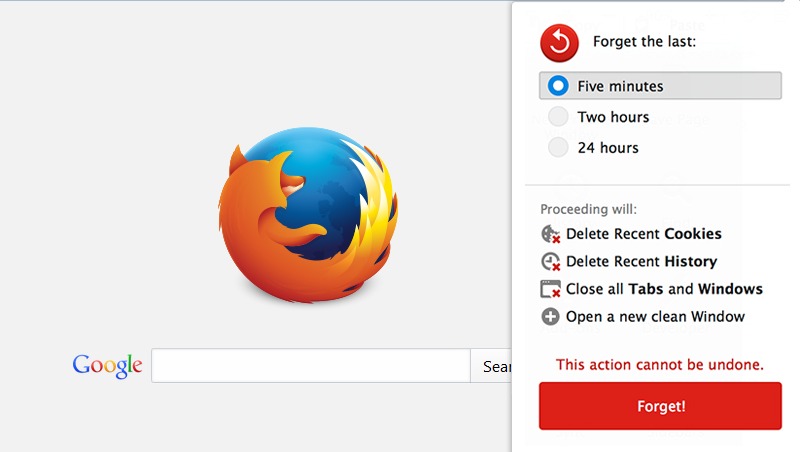
How to add the Forget Button in Firefox 35. Enable and use the Forget Button in Firefox 35 to delete (clear) the browsing history instantly. Firefox (33.1 onwards) comes with a new Forget button which quickly deletes the Firefox browsing history. The Forget button with the new version of Firefox wipes out the recent browsing history […]
Ubuntu Terminal Commands To Get Linux System Information
How to find out Linux Ubuntu version installed? How to tell if you’re using 32-bit or 64-bit Ubuntu System. Find Kernel version and Unity version installed in Ubuntu. Find partition size information of the HDD in Terminal. How to find out Linux Ubuntu version installed? An easy way to find the version of Ubuntu […]
Customize Ubuntu 14.10: Install Flash Plugin & Java in Ubuntu 14.10
How to customize Ubuntu 14.10. How to install Flash Plugin & Java Ubuntu 14.10 “Utopic Unicorn” Install Flash plugin (11.2) in Ubuntu 14.10 Open Terminal and run the following commands: sudo apt-get install flashplugin-installer If you want to install Flash plugin (14.0 alpha), run the following commands. sudo add-apt-repository ppa:nilarimograd/webupd8 sudo apt-get update sudo apt-get […]