
Customize Ubuntu 16.10. How to enable “minimise on click” on Ubuntu 16.10 Desktop. Enable minimise function on Unity Ubuntu 16.10, via terminal commands or Ubuntu unity tweak tool. By default, the minimise function isn’t enabled in Ubuntu 16.10 Unity Desktop. So you cannot click on an app launcher icon to open an app and again […]
Ubuntu
Latest Ubuntu news updates, Ubuntu tutorials and tips for Ubuntu Linux. Learn to use one the most popular Linux distros. Get the updates and latest releases for Ubuntu.
How To Install Calibre eBook Reader On Ubuntu 16.10

Install Calibre eBook Reader on Ubuntu 16.10. Calibre is a free and open source e-book library management application developed by users of e-books for users of e-books. Calibre 2.X version is the most powerful release of the Calibre ebook software. The e-book editor supports Android phones, tablets on OS X and support for touchscreen windows […]
Install Ubuntu Tweak Tool & Unity Tweak Tool In Ubuntu 16.10

Install Ubuntu customization tools. How to install Ubuntu Tweak and Unity Tweak Tool in Ubuntu 16.10, via PPA. These can be used as Ubuntu Desktop customization tools to change and edit the overall look and feel of Unity (Ubuntu Desktop). Of all the tweak tools available, Unity Tweak Tool and Ubuntu Tweak is most popular. […]
Use Ukuu “Ubuntu Kernel Upgrade Utility” To Install Linux Kernel In Ubuntu

Install Ukuu on Ubuntu Systems and easily install or upgrade the latest release of Kernel on Ubuntu System. Ubuntu Kernel Upgrade Utility is a wonderful tool to upgrade to the latest Kernel release. Ukku fetches the latest main line Linux kernel from kernel.ubuntu.com, and install it automatically. Ukuu 16.7 is the latest release of the […]
Use Neofetch To Display Linux Ubuntu System Information In Terminal
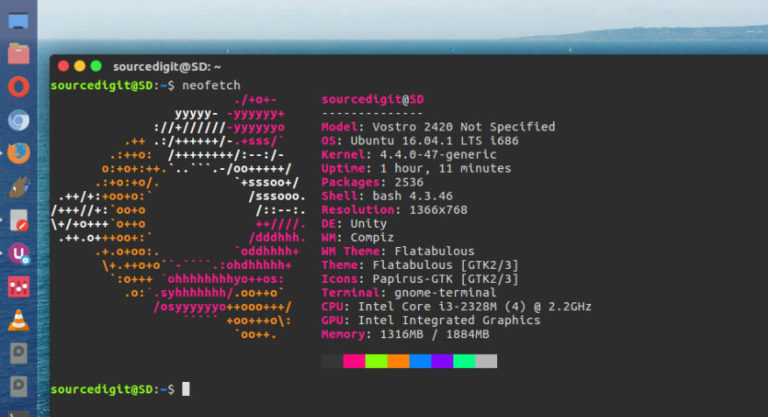
How to display system information on Linux Ubuntu. Install Neofetch, a tool that shows Ubuntu Linux system information with distribution logo in terminal. The neofetch command will then display a brief info about the respective system. It displays info such as Model, OS, Kernel, CPU, GPU, Memory, Uptime, Packages, Shell, Resolution, DE, WM, WM Theme, […]
How to Monitor Progress Of A Linux Command Using ‘pv’

How to monitor progress of Linux commands. Install and use pv command on Ubuntu Systems to monitor the progress of data through a pipe. An easy way to monitor progress of a Linux command line operation. pv – monitor the progress of data through a pipe pv allows a user to see the progress of […]