
Source Digit

Latest Technology, Gadgets & Gizmos

  • Home
  • How To
  • Ubuntu
  • Android
  • Blogging
  • Windows
  • WordPress
  • +More
    • Cloud Computing
    • Gadgets
    • Social Media
    • Technology

How to Install iTunes in Ubuntu 14.10 and Ubuntu 14.04

By Sourabh / January 12, 2015 Category: How To, Ubuntu

How to Install iTunes in Linux Ubuntu 14.10 and Ubuntu 14.04. You can install iTunes in Ubuntu system using playonlinux. Follow the steps below to install iTune in Linux Ubuntu system.

Install PlayonLinux on Ubuntu

Open the terminal and run the following command to install PlayonLinux:


sudo apt-get install playonlinux

Once you have installed playonlinx, follow the steps given below to install iTunes:

1. Open playonlinux and type iTunes in the searchbar. You will find the several version of iTunes.
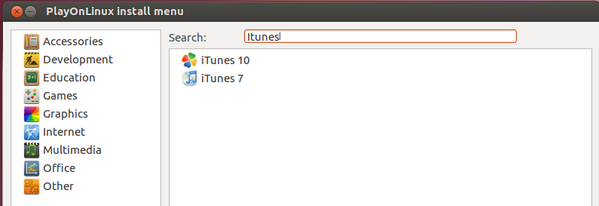
 

Install iTunes on Ubuntu-01
2. Select the version that you want to install.
3. You will see the Installation Wizard popup dialog box. You will be informed with iTunes version and the location of the installation. Click on next to install.
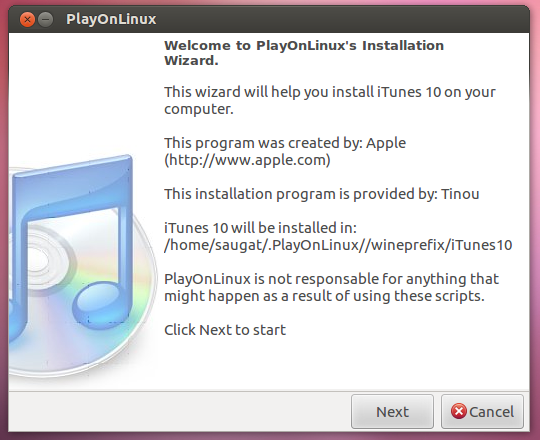
 

Install iTunes on Ubuntu-02
4. PlayonLinux will now download the iTunes installer.
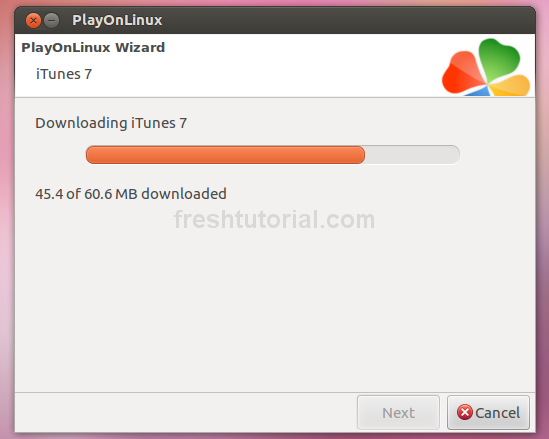
 

Install iTunes on Ubuntu -03
5. You will see installation widget for iTunes. Click on Next and follow the installation procedure.
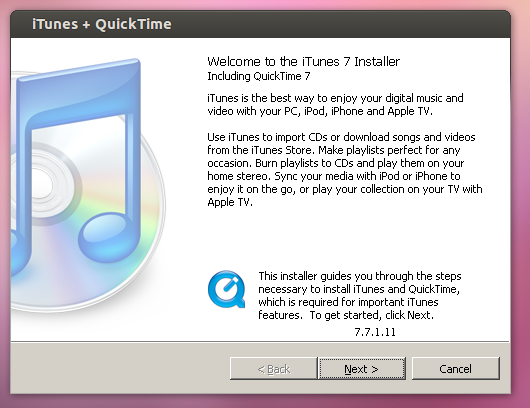
 

Install iTunes on Ubuntu -04
6. After few seconds, iTunes will be installed in your Linux Ubuntu system.
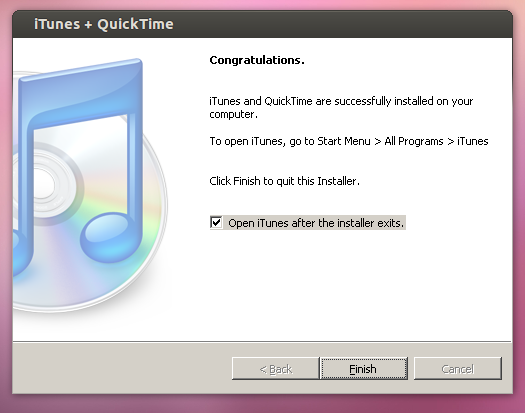
 

Install iTunes on Ubuntu -06

Tags: Install iTunes, Install iTunes in Linux, Install iTunes on Ubuntu 14.04, Install iTunes on Ubuntu 14.10, Ubuntu 14.04, Ubuntu 14.04 How to Install iTunes, Ubuntu 14.10

Source Digit

Latest Posts

LibreOffice 5.4.4 Available For Download – Install LibreOffice On Linux

Tilix 1.7.3 Terminal Emulator – Install Terminix On Ubuntu

Install Avidemux Video Editor 2.7 on Ubuntu Linux

Kdenlive 17.12.0 Released – Install Kdenlive Video Editor On Linux Ubuntu

GIMP 2.9.8 Released – Install GIMP Image Editor on Linux Ubuntu

MPV Player 0.28 Released – Install MPV Video Player on Linux Ubuntu

PyCharm 2017.3.2 – Install Python IDE for Linux Ubuntu

Fix E: Could not get lock /var/lib/dpkg/lock – Unable to lock the directory

How To Use Task Manager In Ubuntu

How To Kill Process in Linux Ubuntu By PID Or Name

© 2018 Source Digit • Latest Technology, Gadgets & Gizmos

  • Home
  • About
  • Privacy Policy
  • Terms & Conditions
  • Contact Us
  • Sitemap