
• Skip to primary navigation
  • Skip to main content
  • Skip to primary sidebar
Source Digit

Source Digit

Linux, Ubuntu Tutorials & News, Technology, Gadgets & Gizmos

  • Home
  • How To
  • Ubuntu
  • Instagram
  • Blogging
  • Android
  • WordPress
  • +More
    • Cloud Computing
    • Gadgets
    • Social Media
    • Technology
  • Write for Us
Home / How To / How to Install Kingsoft WPS Office on Ubuntu 15.04, Ubuntu 14.04 and Ubuntu 14.10

How to Install Kingsoft WPS Office on Ubuntu 15.04, Ubuntu 14.04 and Ubuntu 14.10

By Sourabh / May 21, 2015 Category: How To, Ubuntu

Download the WPS Office suite for Linux Ubuntu Systems. Install Kingsoft WPS Office on on Ubuntu 15.04, Ubuntu 14.04 and Ubuntu 14.10. MS Office alternative Kingsoft (WPS) Office is available for Ubuntu/Linux Mint/and Ubuntu Derivatives.

The Kingsoft WPS Office for Linux Ubuntu is a simple and powerful office suite which is the most suitable MS office alternative for Ubuntu. It is very similar to Windows MS Office and the suite comprises of Kingsoft Writer, Kingsoft Presentation and Kingsoft Spreadsheet.

Install Kingsoft WPS Office in Ubuntu 14.04 & Ubuntu 14.10
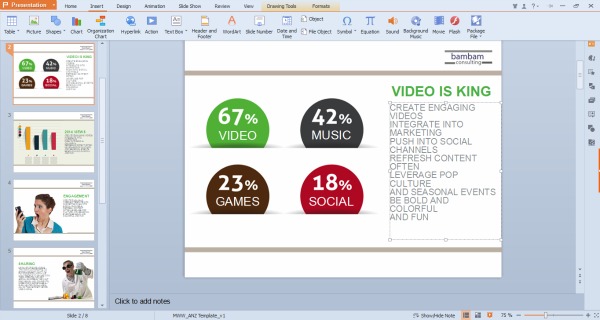
Presentation_Slide2

The WPS Office is fully compatible with Fedora, CentOS, OpenSUSE, Ubuntu, Mint, Knoppix and more. It supports both 32 and 64 bit systems and is fully compatible with Microsoft Office. It also features spell check available in over 10 different languages.

WPS Office Features:

  • Fully compatible with Microsoft PowerPoint (.PPT, .DOC, .DOCX, .XLS and .XLSX)
  • Insert photos, videos, custom animation and more.
  • Rich text, page and paragraph formatting features
  • Collaborate with others using track changes and comments

For 32-bit

Terminal commands to install Kingsoft (WPS) Office on 32bit Linux Ubuntu Systems:

cd && wget -O wps-office.deb http://kdl.cc.ksosoft.com/wps-community/download/a18/wps-office_9.1.0.4953~a18_i386.deb
sudo dpkg -i wps-office.deb
sudo apt-get -f install && rm wps-office.deb
wget -O web-office-fonts.deb http://kdl.cc.ksosoft.com/wps-community/download/a15/wps-office-fonts_1.0_all.deb
sudo dpkg -i web-office-fonts.deb

For 64-bit

Terminal commands to install Kingsoft (WPS) Office on 64bit Linux Ubuntu Systems:

cd && wget -O wps-office.deb http://kdl.cc.ksosoft.com/wps-community/download/a18/wps-office_9.1.0.4953~a18_amd64.deb
sudo dpkg -i wps-office.deb
sudo apt-get -f install && rm wps-office.deb
wget -O web-office-fonts.deb http://kdl.cc.ksosoft.com/wps-community/download/a15/wps-office-fonts_1.0_all.deb
sudo dpkg -i web-office-fonts.deb

Remove & Uninstall Kingsoft WPS Office

If you want to uninstall and remove the Kingsoft WPS Office suite from the Ubuntu system, run the following command:

sudo apt-get remove wps-office

Tags: How to Install Kingsoft WPS Office on Ubuntu, Install Kingsoft (WPS) Office on Ubuntu 14.04, Install Kingsoft WPS Office on Ubuntu 14.10, Install Kingsoft WPS Office on Ubuntu 15.04, Kingsoft Office for Linux, Kingsoft WPS Office for Linux Alpha16, Kingsoft WPS Office PPA Ubuntu, Kingsoft WPS Office Software Ubuntu, Kingsoft WPS Office Suite Ubuntu, Kingsoft WPS Office Ubuntu, MS office alternative for Linux, MS office alternative for Ubuntu, MS Office for Ubuntu, Office for Linux, Office Suite for Linux Ubuntu, Ubuntu 14.04, Ubuntu 14.10, Ubuntu 15.04, Ubuntu Kingsoft WPS Office, Ubuntu WPS Office Suite Download, WPS Office for Linux Ubuntu, WPS Office Suite Download Ubuntu, WPS Office Suite Ubuntu Download, WPS Office: Microsoft Office Clone For Ubuntu!

Primary Sidebar

Latest Posts

Use Locate Command To Find File In Linux Terminal By Name

How To Change Terminal Color In Ubuntu Command Line

How To Run Fsck Manually In Linux To Fix Unexpected Inconsistency

How To Fix Broken Packages On Ubuntu From Terminal

Re Execute The Previous Command In Linux Ubuntu Command Line

How Much RAM Is Needed For Ubuntu PC

How To Find Large Files And Directories In Linux Command Line

How To Use Clear Command History In Linux Terminal

Linux Command To Check RAM Size In Ubuntu Terminal In GB

How To Install Proprietary Drivers In Linux Ubuntu Using Terminal

© 2026 Source Digit • Linux, Ubuntu Tutorials & News, Technology, Gadgets & Gizmos

  • Home
  • About
  • Privacy Policy
  • Terms & Conditions
  • Contact Us
  • Sitemap