
• Skip to primary navigation
  • Skip to main content
  • Skip to primary sidebar
Source Digit

Source Digit

Linux, Ubuntu Tutorials & News, Technology, Gadgets & Gizmos

  • Home
  • How To
  • Ubuntu
  • Instagram
  • Blogging
  • Android
  • WordPress
  • +More
    • Cloud Computing
    • Gadgets
    • Social Media
    • Technology
  • Write for Us
Home / How To / How To Enable ‘Minimise On Click’ in Ubuntu 15.04 (Unity 7.3)

How To Enable ‘Minimise On Click’ in Ubuntu 15.04 (Unity 7.3)

By Sourabh / June 22, 2015 Category: How To, Ubuntu

You can enable ‘Minimise On Click’ in Ubuntu 15.04 (Unity 7.3) using CCSM (CompizConfig Settings Manager). Minimize on click in Ubuntu 15.04 is not enabled by default and you will have to enable it using CCSM (CompizConfig Settings Manager).

You can also enable ‘Minimise On Click’ in Ubuntu 15.04 (Unity 7.3) using a third-party PPA. This third-party PPA offers Ubuntu users a newer version of the Unity desktop with ‘minimise on click’ feature.

Install New Minimize on Click Function – CompizConfig Settings Manager CCSM

Ubuntu 15.04 comes with “minimise on click” Unity feature which allow app windows to be minimised by clicking on its respective icon in the Unity Launcher. It will function just like a Window OS click launcher and the app windows can be restored once user re-click on the app icon.

The Minimize on click in Ubuntu 15.04 is not enabled by default and you will have to enable it using CCSM (CompizConfig Settings Manager).

sudo apt-get install compizconfig-settings-manager

You can also install it via Ubuntu Software Center.

Once installed, go to Dash and type CCM and open CompizConfig Settings Manager.
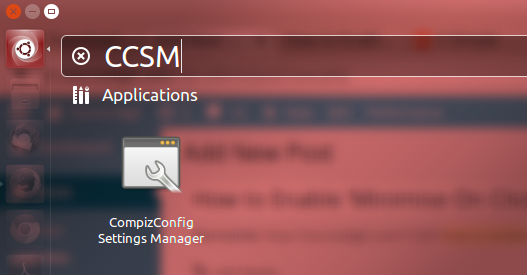
ccsm-ubuntu-1404

Under Compizconfig Settings Manager, click Ubuntu Unity Plugin and under the Launcher tab, tick the option “Minimize Single Window Applications (Unsupported).”
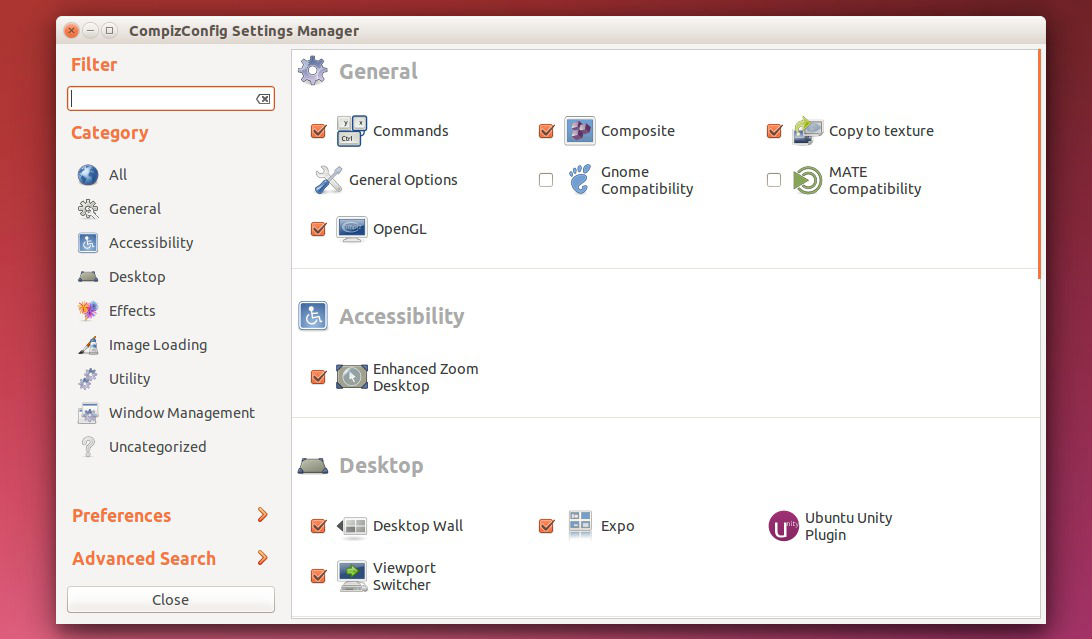
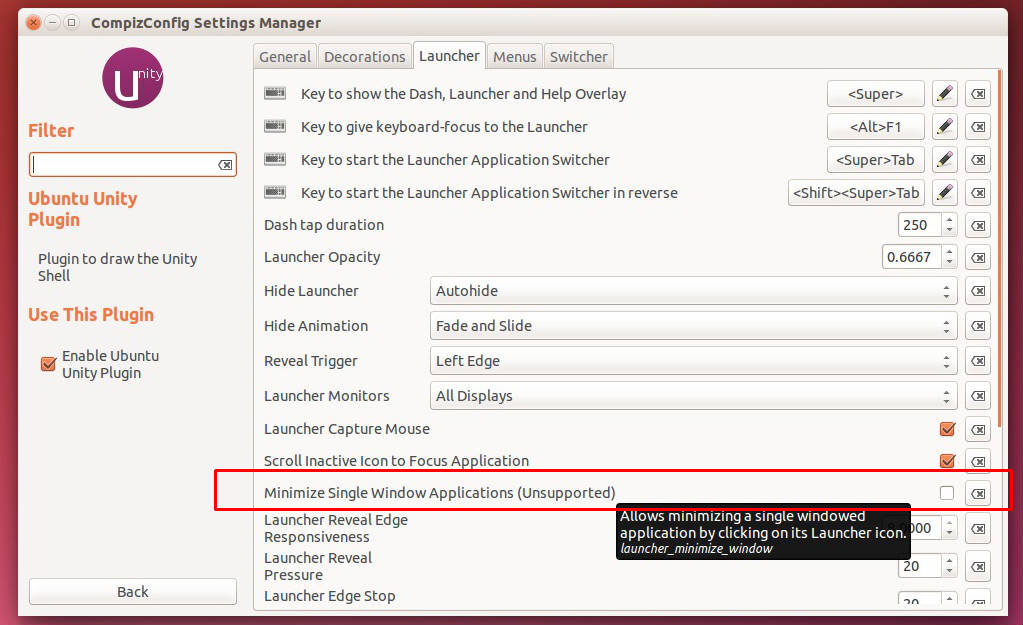
 

Ubuntu-15-04-Minimise-On-Click


Ubuntu-15-04-Minimise-On-Click-02

Tags: CCSM CompizConfig Settings Manager Ubuntu 15.04, Customize Ubuntu 15.04, Customize Ubuntu 15.04 Mouse Settings, Customize Ubuntu 15.04: Enable ‘Minimise On Click’ in Ubuntu 15.04, Double Click Minimise in Ubuntu 15.04, Enable ‘Minimise On Click’ in Ubuntu 15.04 Vivid Vervet, Enable ‘Minimise On Click’ in Unity 7.3, Enable ‘Minimise On Click’ Unity 7.3 Ubuntu 15.04, How To Enable ‘Minimise On Click’ in Ubuntu 15.04, Install New Minimize on Click Function Ubuntu 15.04 Vivid Vervet, Minimize on Click Function Ubuntu 15.04, Minimize on Click Function Ubuntu 15.04 CompizConfig Settings Manager CCSM, Ubuntu 15.04, Ubuntu 15.04 CompizConfig Settings Manager, Ubuntu 15.04 Double Click Minimise, Ubuntu 15.04 Enable ‘Minimise On Click’, Ubuntu 15.04 Vivid Vervet Minimize on Click Function, Unity Ubuntu Enable ‘Minimise On Click’

Primary Sidebar

Latest Posts

How To Fix Broken Packages On Ubuntu From Terminal

Re Execute The Previous Command In Linux Ubuntu Command Line

How Much RAM Is Needed For Ubuntu PC

How To Find Large Files And Directories In Linux Command Line

How To Use Clear Command History In Linux Terminal

Linux Command To Check RAM Size In Ubuntu Terminal In GB

How To Install Proprietary Drivers In Linux Ubuntu Using Terminal

How To Shutdown Linux With A 15 Minute Delay And Message

Free AI Courses With Certificate For Beginners In India

Best AI Plugins For WordPress To Use In 2026

© 2026 Source Digit • Linux, Ubuntu Tutorials & News, Technology, Gadgets & Gizmos

  • Home
  • About
  • Privacy Policy
  • Terms & Conditions
  • Contact Us
  • Sitemap