• Skip to primary navigation
  • Skip to main content
  • Skip to primary sidebar
Source Digit

Source Digit

Linux, Ubuntu Tutorials & News, Technology, Gadgets & Gizmos

  • Home
  • How To
  • Ubuntu
  • Instagram
  • Blogging
  • Android
  • WordPress
  • +More
    • Cloud Computing
    • Gadgets
    • Social Media
    • Technology
  • Write for Us
Home / How To / How To Check Laptop CPU Temperature In Ubuntu Systems

How To Check Laptop CPU Temperature In Ubuntu Systems

By Sourabh / October 4, 2016 Category: How To, Ubuntu

Ubuntu Temperature Monitor via Command Line. How to install Psensor in Ubuntu 15.10, Ubuntu 14.04 and check laptop CPU temperature in Ubuntu Systems.

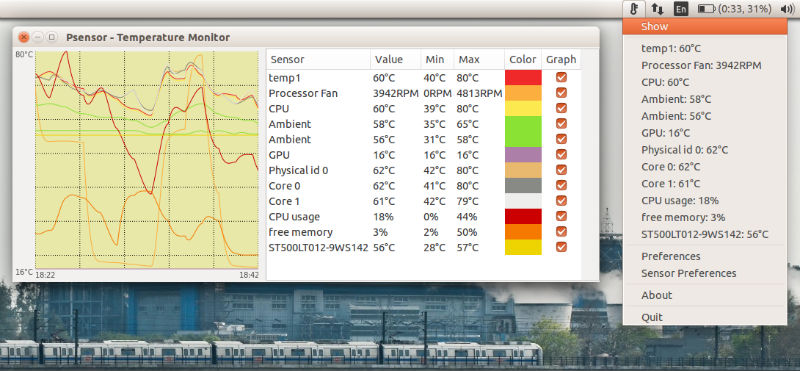
Psensor is a graphical temperature monitor tool for Linux Ubuntu Systems that can monitor hardware temperature and fanspeed in Ubuntu. In simple words, Psensor is a tool to monitor hardware temperature that integrates nicely with Unity by using an Unity Launcher counter which displays the enabled temperatures as well as an appindicator that you can use to take a quick look at all available hardware temperatures or cpu usage.
ubuntu-psensor

Psensor can monitor:

  • motherboard and CPU temperatures
  • the temperature of Nvidia GPUs
  • experimental ATI/AMD GPUs temperature monitor (not enabled for the Ubuntu PPA as it requires compilation using libatiadlxx)
  • hard disk drives temperature
  • fan speed
  • CPU usage

Psensor package in Ubuntu consists of:

  1. psensor: display graphs for monitoring hardware temperature
  2. psensor-common: common files for Psensor and Psensor server
  3. psensor-server: Psensor server for monitoring hardware sensors remotely

Install Psensor in Ubuntu

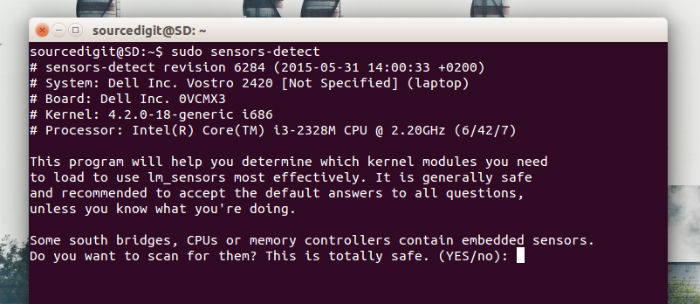
The Psensor can be installed in Ubuntu 15.10, Ubuntu 14.04, Ubuntu 14.10, Ubunt 15.04 and Derivatives. The following commands will also install lm-sensors and hddtemp packages. These packages are required for Psensor to monitor CPU, hard disk and motherboard temperatures and the CPU fan speed:

$ sudo apt-get install lm-sensors hddtemp
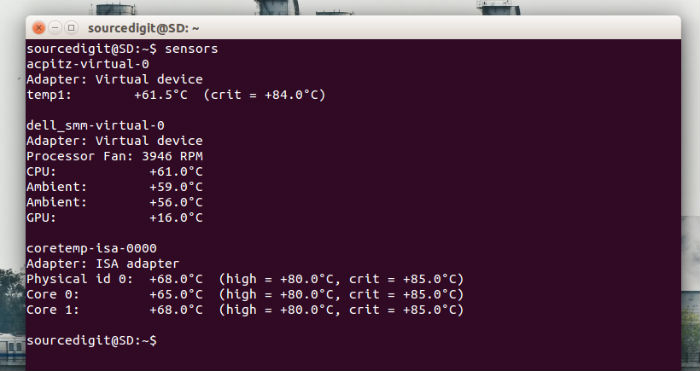
$ sudo sensors-detect
$ sensors
$ sudo apt-get install psensor
psensor-01

sensors-ubuntu-15

You can also install Psensor in Ubuntu 15.10, Ubuntu 14.04 and Derivatives, via PPA:

$ sudo add-apt-repository ppa:jfi/ppa
$ sudo apt-get update
$ sudo apt-get install psensor

Once installed, run the Psensor application via Ubuntu Unity Dash.

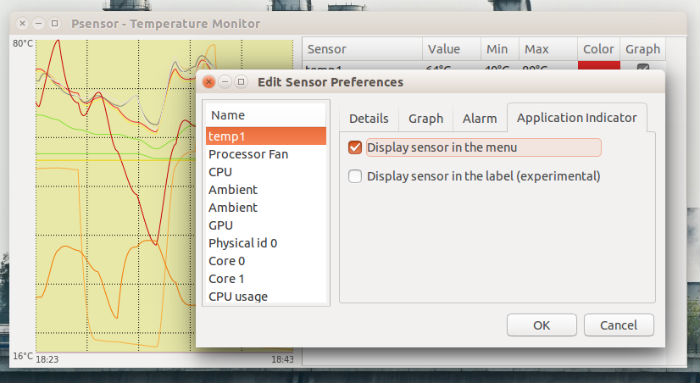
You can also configure Psesnor to display the temperature on the Ubuntu Panel. To do so, click the Psensor indicator, select “Sensor Preferences”, then under the Application Indicator menu, select the component (for which you want to display the temperature) and then check the “Display sensor in the label” option.
ubuntu-psensor-02

If you wish to auto-start Psensor at each System start up, go to Preferences, select Startup and the check “Launch on session startup.”

Tags: Cpu Temperature Monitor Ubuntu, Fedora Cpu Temperature Monitor, Hardware Temperature Monitor Ubuntu, Hardware Temperature Monitor Windows 8, How To Check Laptop CPU Temperature In Ubuntu, How to install Psensor in Ubuntu, How to install Psensor in Ubuntu 14.04, How to install Psensor in Ubuntu 15.04, How to install Psensor in Ubuntu 15.10, How to Monitor Laptop CPU Temperature and Hard Disk in Linux – CLI Command Line and Visual, Linux Sensor Monitor, Linux Temperature Monitoring, Monitor CPU and hard drive temperatures on Ubuntu Linux, Monitor CPU temperatures on Ubuntu Linux, Monitor hard drive temperatures on Ubuntu Linux, Monitor Hardware Temperature In Ubuntu With Psensor, Motherboard Monitor Ubuntu, PSensor Graphical Temperature Monitor, Psensor Ubuntu, Speedfan Ubuntu, Ubuntu Computer Temperature Monitor, Ubuntu Cpu Temperature Monitoring, Ubuntu Heat Monitor, Ubuntu Network Monitoring, Ubuntu Server Monitoring, Ubuntu System Temperature, Ubuntu Temperature Monitor Command Line, Ubuntu Temperature Sensor

Primary Sidebar

Latest Posts

Re Execute The Previous Command In Linux Ubuntu Command Line

How Much RAM Is Needed For Ubuntu PC

How To Find Large Files And Directories In Linux Command Line

How To Use Clear Command History In Linux Terminal

Linux Command To Check RAM Size In Ubuntu Terminal In GB

How To Install Proprietary Drivers In Linux Ubuntu Using Terminal

How To Shutdown Linux With A 15 Minute Delay And Message

Free AI Courses With Certificate For Beginners In India

Best AI Plugins For WordPress To Use In 2026

3 Commands To Check USB Connection In Linux Terminal

© 2026 Source Digit • Linux, Ubuntu Tutorials & News, Technology, Gadgets & Gizmos

  • Home
  • About
  • Privacy Policy
  • Terms & Conditions
  • Contact Us
  • Sitemap