
How to find out the lifespan of Ubuntu Packages. ubuntu-support-status –show-all command shows the lifespan of Linux Ubuntu packages installed on the system.
Display the Status of Ubuntu Packages
Ubuntu users can use the following commands to check the status of all the installed packages. The command also displays the date of packages support ends:
ubuntu-support-status --show-all
Display the unsupported packages only you could use the following command.
ubuntu-support-status --show-unsupported
It is vital to know that because when an Ubuntu release reaches its “end of life” it receives no further maintenance updates, including critical security upgrades. We highly recommend that you upgrade to a recent version of Ubuntu at this point.
Essential Commands
To find your release. Open a terminal and type
lsb_release -a
This command will print the exact status of your system.
ubuntu-support-status
Management of Ubuntu Releases
Support length
- Regular releases are supported for 9 months.
- Long term support (LTS) releases are for 5 years.
- Older releases may have different support length.
Release Cadence
- Releases are published in a time based fashion, every 6 months, following a planned schedule.
Ubuntu Server and Desktop Release End of Life
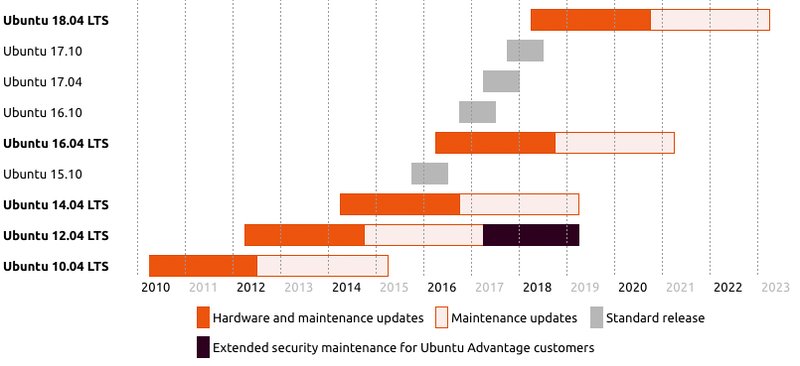
Standard Ubuntu releases are supported for 9 months and Ubuntu LTS (long-term support) releases are supported for five years on both the desktop and the server. During that time, there will be security fixes and other critical updates.
The Ubuntu support lifecycle is as follows:
Kernel release End of Life
The Ubuntu LTS enablement stacks provide newer kernel and X support for existing Ubuntu LTS releases. These can be installed manually, or are automatically shipped if installing from 12.04.2/14.04.2 and newer release media. These newer enablement stacks are meant for desktop and server, and even recommended for cloud or virtual images.
The Ubuntu kernel support lifecycle can be found at https://www.ubuntu.com/info/release-end-of-life