
• Skip to primary navigation
  • Skip to main content
  • Skip to primary sidebar
Source Digit

Source Digit

Linux, Ubuntu Tutorials & News, Technology, Gadgets & Gizmos

  • Home
  • How To
  • Ubuntu
  • Instagram
  • Blogging
  • Android
  • WordPress
  • +More
    • Cloud Computing
    • Gadgets
    • Social Media
    • Technology
  • Write for Us
Home / How To / Two Ways To Disable Amazon Shopping Suggestions in Ubuntu 14.10 & Ubuntu 14.04

Two Ways To Disable Amazon Shopping Suggestions in Ubuntu 14.10 & Ubuntu 14.04

By Sourabh / January 11, 2015 Category: How To, Ubuntu

How to disable Amazon search in Ubuntu 14.10 & Ubuntu 14.04. Remove and disable Amazon shopping suggestions from Unity Dash in Ubuntu 14.10 & Ubuntu 14.04.

By default, when you search anything in Ubuntu Unity Dash, you are displayed some shopping suggestions from Amazon and other online sources. These shopping suggestions are often annoying and doesn’t serve any prupose. Luckily, you can disable Amazon shopping suggestions in Ubuntu systems. Here is how to do this:

Disable Amazon Shopping Suggestions in Ubuntu

There are two methods to disable Amazon shopping suggestions or product suggestions from Unity Dash in Ubuntu 14.10 & Ubuntu 14.04:

  1. Using System Settings
  2. Using Command Line/Terminal

Using System Settings

If you want to disable Amazon shopping suggestions or product suggestions on Ubuntu systems, follow the steps given below:

1. Open Settings.
2. Click Security and Privacy.
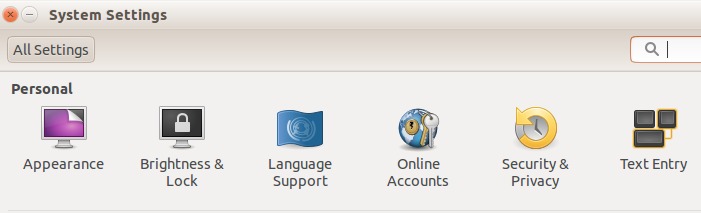
Disable Amazon Search in Ubuntu-1
3. Open on the Search tab.
4. Switch off toggle “Include online search results”
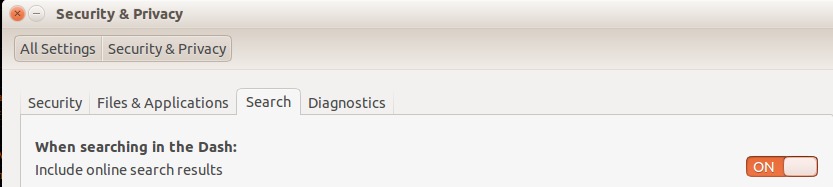
Disable Amazon Search in Ubuntu-2
5. It’s done. Restart the system to apply the changes.

Using Command Line/Terminal

Open a terminal and use the following command:


gsettings set com.canonical.Unity.Lenses disabled-scopes "['more_suggestions-amazon.scope', 'more_suggestions-u1ms.scope', 'more_suggestions-populartracks.scope', 'music-musicstore.scope', 'more_suggestions-ebay.scope', 'more_suggestions-ubuntushop.scope', 'more_suggestions-skimlinks.scope']"

After executing the above commands, restart the system and you will no longer see any shopping suggestion in Unity Dash anymore.

Tags: Disable Amazon Recommendations in Ubuntu, Disable Amazon Search in Ubuntu, Disable Amazon Shopping Suggestions Ubuntu 14.04, Two Ways To Disable Amazon Shopping Suggestions in Ubuntu 14.10, Ubuntu 14.04, Ubuntu 14.04 Disable Amazon, Ubuntu 14.10, Ubuntu Remove Amazon, Ubuntu Remove Amazon App

Primary Sidebar

Latest Posts

Delete Directory And Contents Recursively Without Prompt On Linux

Check User Login History In Ubuntu Linux Command Line

Use Locate Command To Find File In Linux Terminal By Name

How To Change Terminal Color In Ubuntu Command Line

How To Run Fsck Manually In Linux To Fix Unexpected Inconsistency

How To Fix Broken Packages On Ubuntu From Terminal

Re Execute The Previous Command In Linux Ubuntu Command Line

How Much RAM Is Needed For Ubuntu PC

How To Find Large Files And Directories In Linux Command Line

How To Use Clear Command History In Linux Terminal

© 2026 Source Digit • Linux, Ubuntu Tutorials & News, Technology, Gadgets & Gizmos

  • Home
  • About
  • Privacy Policy
  • Terms & Conditions
  • Contact Us
  • Sitemap