
Install the updated Unity 8 and Mir on Linux Ubuntu Systems. Terminal commands to install Unity 8 Desktop and Mir on Ubuntu 15.04, Ubuntu 14.04 & Derivatives. The Unity 8 and Mir have received various fixes and new improvements. Canonical has made it possible to install and test the latest Unity 8 desktop environment on […]
How To
How-to tutorials for Ubuntu, Linux, Android, WordPress, websites and more. Learn about Ubuntu Linux how to solve problems, errors, manage updates, fix issues and add functions & features.
Install Mozilla Thunderbird 38.0.1 on Ubuntu 15.04 and Ubuntu 14.04
Install Mozilla Thunderbird 38.0.1 on Linux Ubuntu 15.04, Ubuntu 14.04 and Derivatives. Thunderbird 38.0.1 supports OAuth2 authentication and support for Yahoo Messenger in Chat. What’s New in Thunderbird 38.0.1: GMail supports OAuth2 authentication, removing the need to manually select “allow less secure applications” in Google options for the account Ship Lightning calendar addon with Thunderbird […]
Install FFmpeg 2.7 Multimedia Framework on Ubuntu 15.04, Ubuntu 14.04 and Derivatives
Install FFmpeg 2.7 Multimedia Framework and convert multimedia files on Linux Ubuntu Systems. Install FFmpeg 2.7 on Ubuntu 15.04, Ubuntu 14.04 and Derivatives. Below are the Terminal commands to upgrade to FFmpeg 2.7 on Linux. FFmpeg 2.7 is a popular cross-platform solution to record, convert and stream audio and video. It includes libavcodec – the […]
Install FreeFileSync 7.1 To Synchronize Files & Folders on Linux Ubuntu Systems
Synchronize files and folders on Linux Ubuntu Systems. Install FreeFileSync 7.1 on Ubuntu 15.04, Ubuntu 14.04 and Derivatives. FreeFileSync is an open-source folder comparison and synchronization tool for Linux. It supports binary file comparison, handle symlinks, copy NTFS extended attributes and security permissions, fail-safe file copy, include/exclude file via filter, optimized runtime performance, detailed error […]
Install Google Chrome 43.0 (via PPA) on Ubuntu or Linux Mint
Install Google Chrome 43.0 (via PPA) on Ubuntu or Linux Mint. Terminal commands to install Google Chrome 43 web browser on Linux Ubuntu 15.04, Ubuntu 14.04, Ubuntu 14.10 and Ubuntu derivative systems. Google Chrome 43 has been released with an updated Flash and important security improvements. To be more specific, the Google Chrome 43 (Chrome […]
Install Shotcut 15.06 Video Editor On Linux Ubuntu 15.04, Ubuntu 14.04 & Derivatives
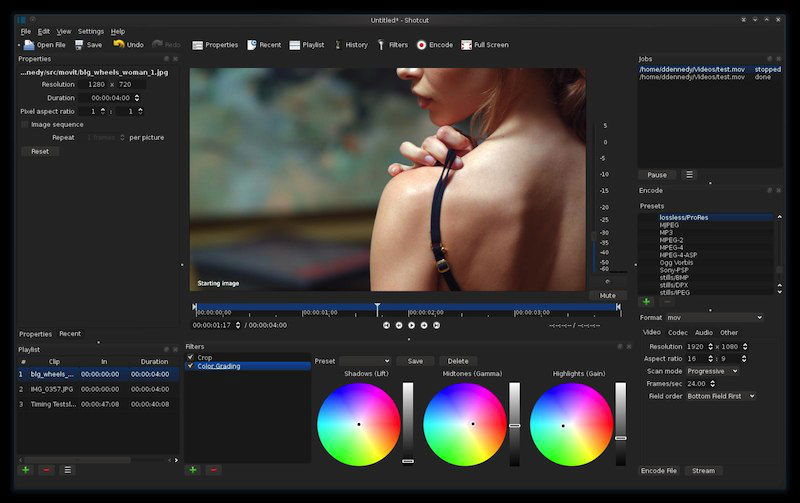
Shotcut 15.06 (Video Editor for Linux Ubuntu). Install Shotcut video editor on Ubuntu 15.04, Ubuntu 14.04 and derivatives. Shotcut is a free, open source, cross-platform video editor. The Shotcut 15.06 video editor supports oodles of audio and video formats and codecs (thanks to FFmpeg). It also supports many image formats such as BMP, GIF, JPEG, […]