
Notes is a simple (yet powerful) Linux note-taking app. Here’s how to install Notes, the minimal note taking app on Ubuntu 15.10, Ubuntu 15.04, Ubuntu 14.04, Ubuntu 14.10 and Linux Mint Systems. Notes is a very basic and mininal, cross platform note taking app. The Notes app can be installed on Linux Ubuntu and Mint […]
Install DeaDBeeF 7.0 music player on Ubuntu 15.10 & Ubuntu 15.04
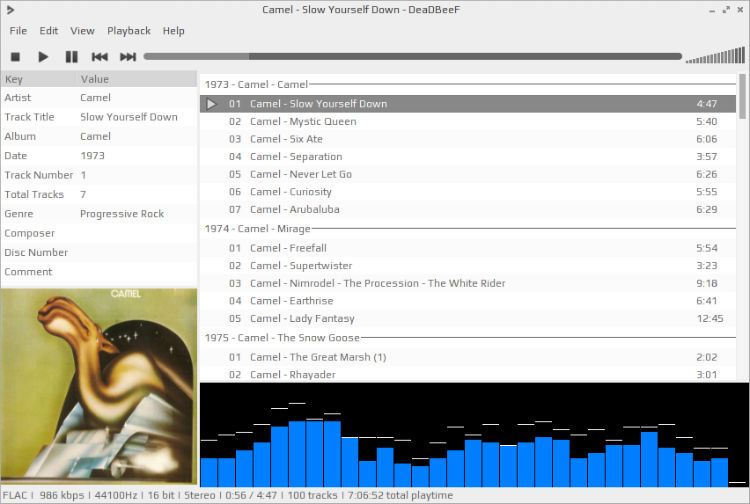
DeaDBeeF music player for Linux Ubuntu Systems. Install DeaDBeeF 7.0 music player on Ubuntu 15.10, Ubuntu 15.04, Ubuntu 14.04 and Ubuntu 14.10. DeaDBeeF is an audio player for GNU/Linux, *BSD, OpenSolaris, Mac OS X, and other UNIX-like systems. There’s also the DeaDBeeF For Android, which is a very different product. There are no Windows or […]
How To Download & Install N1 Email Client on Linux Ubuntu
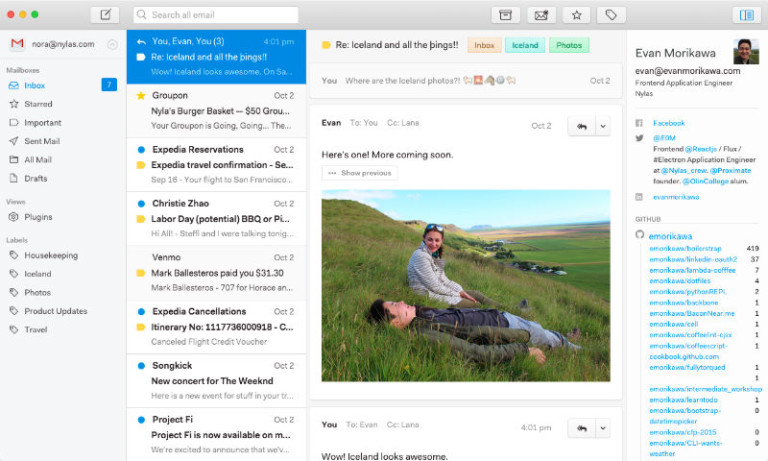
How to download and install N1 Email Client on Linux Ubuntu Systems. Here’s how to set up and use Nylas N1 Email Client on Ubuntu. N1 is an extensible, open source mail client for Linux Systems. N1 mail client has many powerful features such as offline mode, Javascript plugin architecture and multi-account support. The mail […]
List of Ubuntu Unity Desktop Shortcuts – Ubuntu Unity Hotkeys
What are Ubuntu Unity’s keyboard and mouse shortcuts for Unity. List of Ubuntu Unity shortcut keys. Most useful Ubuntu Unity Desktop shortcuts – Ubuntu Unity Hotkeys. Ubuntu Unity’s Keyboard Shortcuts Holding down the Super key will get you a keyboard overlay that documents most of these (12.04 and earlier). Launcher Ubuntu Unity’s Keyboard Hold Super […]
Install Grub Customizer on Ubuntu, via PPA
Install grub customizer on Ubuntu, via PPA. How to configure the GRUB2 Boot Loader’s settings using graphical bootloader Ubuntu Systems. GRUB GRUB 2 is the default boot loader and manager for Ubuntu since version 9.10 (Karmic Koala). As the computer starts, GRUB 2 either presents a menu and awaits user input or automatically transfers control […]