
• Skip to primary navigation
  • Skip to main content
  • Skip to primary sidebar
Source Digit

Source Digit

Linux, Ubuntu Tutorials & News, Technology, Gadgets & Gizmos

  • Home
  • How To
  • Ubuntu
  • Instagram
  • Blogging
  • Android
  • WordPress
  • +More
    • Cloud Computing
    • Gadgets
    • Social Media
    • Technology
  • Write for Us
Home / How To / How To Install XnView Image Viewer & Editor On Ubuntu 16.04

How To Install XnView Image Viewer & Editor On Ubuntu 16.04

By Sourabh / November 2, 2016 Category: How To, Ubuntu

How to install XnView on Ubuntu 16.04. XnView Image Viewer & Editor for Linux Ubuntu Systems is an awesome software for reading, viewing, and processing all your images.

XnView lets you read about 500 formats (including Multipage and animated still formats APNG, TIFF, GIF, ICO,etc..). Some other notable features of XnView are metadata support and editing (IPTC), JPEG lossless transforms, duplicate file finder, batch processing and batch rename function.
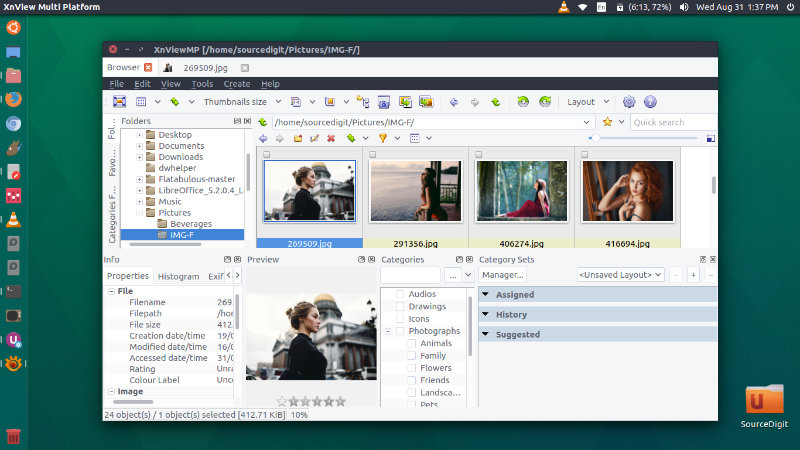
xnview-ubuntu

Other functions are:

View Functions – With XnView you can browse, organize, and view your images in numerous ways:

  • Thumbnail View
  • FullScreen View
  • FilmStrip View
  • SlideShow with FX
  • Images Compare

Edit Functions – XnView allows you to process your images with an arsenal of editing tools:

  • Resize, Rotate, Crop
  • Lossless Rotate & Crop (jpeg)
  • Adjust Brightness, Contrast, …
  • Auto Levels, Auto Contrast
  • Modify Colors depth & palette
  • Apply filters & Effect

In addition to the basic viewing and exporting functions, XnView lets you create slideShows web pages, contact sheets, video thumbnails gallery and strip of images.

Install xnViewMP on Ubuntu

Open Terminal and run the following command to install xnViewMP on Ubuntu 16.04, Ubuntu 15.04, Ubuntu 14.04 and Derivarives:

sudo sh -c 'echo "deb http://archive.getdeb.net/ubuntu trusty-getdeb apps" >> /etc/apt/sources.list'
wget -q -O- http://archive.getdeb.net/getdeb-archive.key | sudo apt-key add -
sudo apt-get update
sudo apt-get install xnviewmp

Ubuntu users can also install xnViewMP from DEB packages. To do so, run the command given below:

For 32 Bit Ubuntu


sudo apt-get install gdebi
wget http://download.xnview.com/XnViewMP-linux.deb
sudo gdebi XnViewMP-linux.deb

For 64 Bit Ubuntu


sudo apt-get install gdebi
wget http://download.xnview.com/XnViewMP-linux-x64.deb
sudo gdebi XnViewMP-linux-x64.deb

Once installed, open the XnView from Ubuntu Dash or Terminal.

Tags: Install XnView Image Editor On Ubuntu, Install XnView Image Viewer On Ubuntu, Install XnView On Ubuntu, Ubuntu 16.04 XnView Image Editor, Ubuntu 16.04 XnView Image Viewer, Ubuntu 16.10 XnView Image Editor, Ubuntu 16.10 XnView Image Viewer, Ubuntu PPA XnView, Ubuntu XnView, Ubuntu XnView Image Editor, Ubuntu XnView Image Viewer, XnView Image Editor Ubuntu, XnView Image Editor Ubuntu 16.04, XnView Image Editor Ubuntu 16.10, XnView Image Viewer Ubuntu, XnView Image Viewer Ubuntu 16.04, XnView Image Viewer Ubuntu 16.10, XnView Ubuntu, XnView Ubuntu PPA

Primary Sidebar

Latest Posts

How To Run Fsck Manually In Linux To Fix Unexpected Inconsistency

How To Fix Broken Packages On Ubuntu From Terminal

Re Execute The Previous Command In Linux Ubuntu Command Line

How Much RAM Is Needed For Ubuntu PC

How To Find Large Files And Directories In Linux Command Line

How To Use Clear Command History In Linux Terminal

Linux Command To Check RAM Size In Ubuntu Terminal In GB

How To Install Proprietary Drivers In Linux Ubuntu Using Terminal

How To Shutdown Linux With A 15 Minute Delay And Message

Free AI Courses With Certificate For Beginners In India

© 2026 Source Digit • Linux, Ubuntu Tutorials & News, Technology, Gadgets & Gizmos

  • Home
  • About
  • Privacy Policy
  • Terms & Conditions
  • Contact Us
  • Sitemap