
• Skip to primary navigation
  • Skip to main content
  • Skip to primary sidebar
Source Digit

Source Digit

Linux, Ubuntu Tutorials & News, Technology, Gadgets & Gizmos

  • Home
  • How To
  • Ubuntu
  • Instagram
  • Blogging
  • Android
  • WordPress
  • +More
    • Cloud Computing
    • Gadgets
    • Social Media
    • Technology
  • Write for Us
Home / How To / Corebird 1.4 Released; Install Corebird Twitter Client On Ubuntu

Corebird 1.4 Released; Install Corebird Twitter Client On Ubuntu

By Sourabh / January 30, 2017 Category: How To, Ubuntu

Corebird 1.4 Twitter Client for Linux Ubuntu is released. Install Corebird 1.4 on Ubuntu 16.10 and Ubuntu 16.04 Systems. Corebird 1.4 Twitter Client now allows deleting tweets from the tweet info page and not just from timelines. Also the images in quoted tweets now look more like they actually belong to the quoted tweet instead of the quoting tweet.
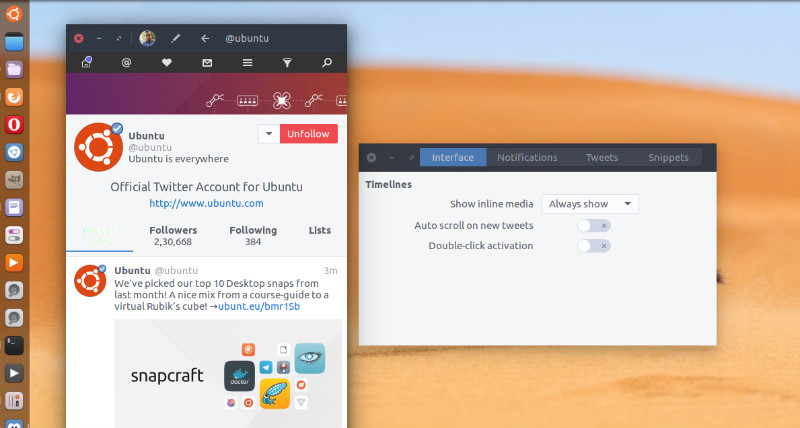
corebird-3

Corebird 1.4 Twitter Client Changes & Features

  • Images in quoted tweets now look more like they actually belong to the quoted tweet instead of the quoting tweet.
  • Allow deleting tweets from the tweet info page and not just from timelines.
  • Fix the user completion not showing all possible results
  • Focus the already opened window for an account if the account gets selected in the accounts popover
  • Avoid window resizing when typing in the Direct Message text box
  • Add ‘q’ accelerator to tweet rows for quoting
  • Add spellchecking. This add a dependency to gspell
  • Increase gtk+ dependency to 3.18 to get rid of some workarounds.
  • Increase avatar size in profiles and slightly overlap them over the banner. Also, always show the full banner.
  • Fix completion popup positioning under Wayland
  • Add experimental meson build files
  • Fix some videos not playing correctly
  • Add a minimal video progress indicator to the video dialog
  • Fix the retweet/favorite count updating in the tweet info page

Install Corebird 1.4 Twitter Client on Ubuntu

Open terminal and run the following commands to install Corebird 1.4 on Ubuntu 16.10, Ubuntu 16.04, Ubuntu 15.10, Ubuntu 15.04, Ubuntu 14.04 and Ubuntu 14.10 Systems:

$ sudo add-apt-repository ppa:ubuntuhandbook1/corebird
$ sudo apt-get update
$ sudo apt-get install corebird

Set Up Corebird on Ubuntu

Once installed, open Corebird from Ubuntu Dash. Type Corebird and click on it to open the Twitter Client.

For the first time users, you will be asked to authorise Corebird using your Twitter account. All you need is to authorize your Twitter account to use Corebird. Once done, you are ready to use Corebird.

Uninstall Corebird From Ubuntu

If you wish to remove and uninstall corebird, run the command given below:

$ sudo apt install ppa-purge
$ sudo ppa-purge ppa:ubuntuhandbook1/corebird

Tags: Corebird 1.4, Corebird 1.4 Ubuntu, Corebird 1.4 Ubuntu PPA, Corebird PPA Ubuntu, Corebird Twitter 1.4, Corebird Twitter 1.4 Ubuntu, Corebird Twitter Client 1.4, Corebird Twitter Client Linux, Corebird Twitter Client Ubuntu, Corebird Ubuntu 14.04, Corebird Ubuntu 14.10, Corebird Ubuntu 15.04, Corebird Ubuntu 15.10, Corebird Ubuntu 16.04, Corebird Ubuntu 16.10, Corebird Ubuntu 17.04, Corebird Ubuntu 17.10, Install Corebird 1.4 Ubuntu, Linux Corebird Twitter Client, PPA Corebird 1.4 Ubuntu, PPA Ubuntu Corebird 1.4, Ubuntu 14.04 Corebird, Ubuntu 14.10 Corebird, Ubuntu 15.04 Corebird, Ubuntu 15.10 Corebird, Ubuntu 16.04 Corebird, Ubuntu 16.10 Corebird, Ubuntu 17.04 Corebird, Ubuntu 17.10 Corebird, Ubuntu Corebird 1.4, Ubuntu Corebird PPA, Ubuntu Corebird Twitter 1.4, Ubuntu Corebird Twitter Client, Ubuntu Install Corebird 1.4, Ubuntu PPA Corebird 1.4

Primary Sidebar

Latest Posts

Delete Directory And Contents Recursively Without Prompt On Linux

Check User Login History In Ubuntu Linux Command Line

Use Locate Command To Find File In Linux Terminal By Name

How To Change Terminal Color In Ubuntu Command Line

How To Run Fsck Manually In Linux To Fix Unexpected Inconsistency

How To Fix Broken Packages On Ubuntu From Terminal

Re Execute The Previous Command In Linux Ubuntu Command Line

How Much RAM Is Needed For Ubuntu PC

How To Find Large Files And Directories In Linux Command Line

How To Use Clear Command History In Linux Terminal

© 2026 Source Digit • Linux, Ubuntu Tutorials & News, Technology, Gadgets & Gizmos

  • Home
  • About
  • Privacy Policy
  • Terms & Conditions
  • Contact Us
  • Sitemap